

Introduction | 引言
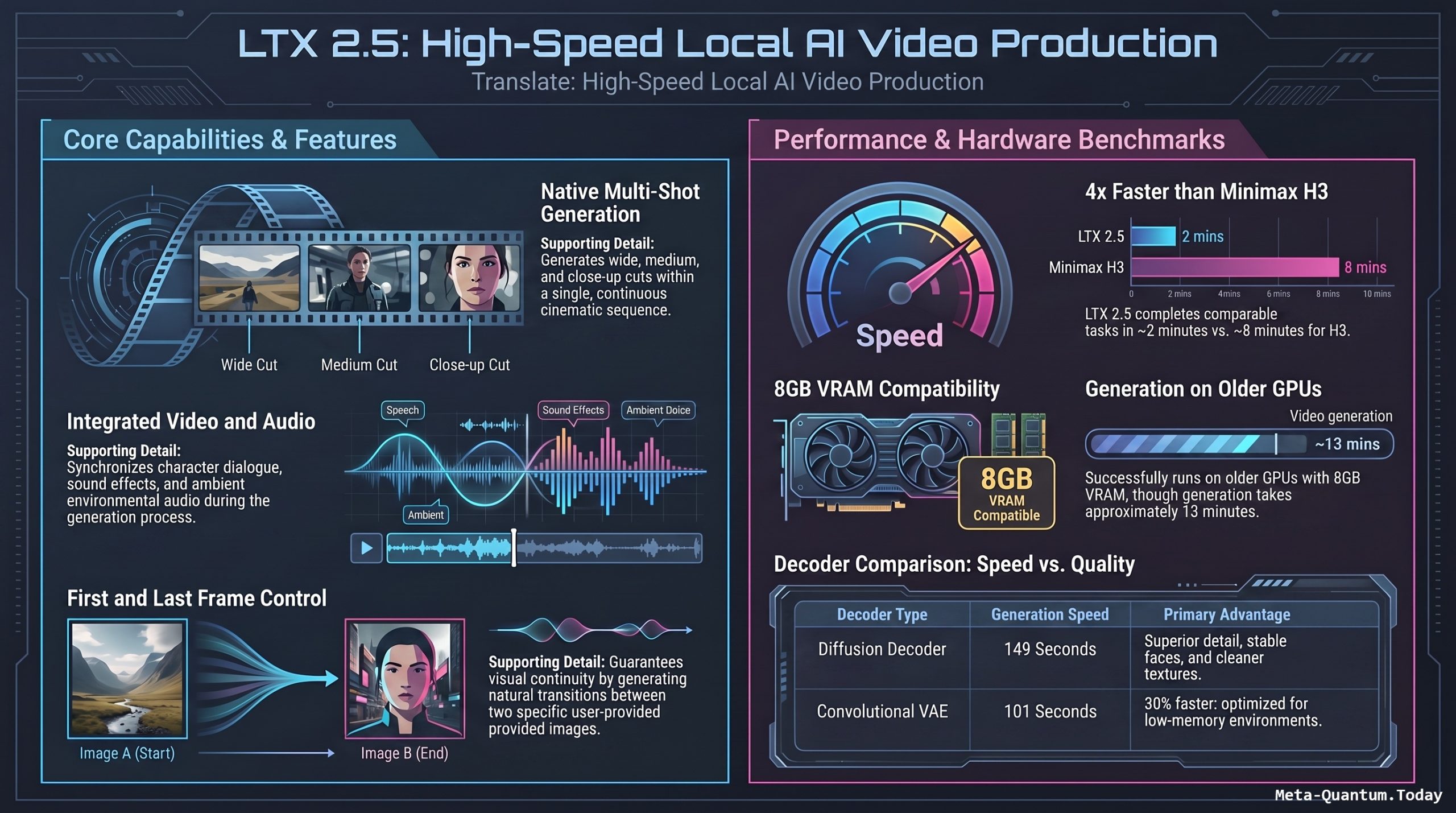
EN: A few days after testing MiniMax H3 — one of the strongest local AI video models around — Smart Vision turns its attention to a new challenger: LTX 2.5. This is still a 22-billion-parameter, open-weight video model that generates video and audio together, but the headline addition this time is native multi-shot generation — the ability to produce a wide shot, a medium shot, and a close-up, all inside a single generation, rather than one continuous take. The video walks through text-to-video, image-to-video, multi-shot, first-and-last-frame generation, a Comfy UI installation walkthrough, a decoder speed/quality comparison, an 8GB VRAM stress test, and finally a head-to-head against MiniMax H3. The core question throughout isn’t just “is it good,” but “is it good enough — and accessible enough — for real production work on ordinary consumer hardware.”
中文: 在测试完本地AI视频模型中的强者MiniMax H3之后没几天,Smart Vision又把目光转向了新挑战者——LTX 2.5。它依然是一个220亿参数的开放权重视频模型,能够同时生成画面与音效,但这次最大的亮点是原生多镜头生成(multi-shot)——可以在同一次生成中,一次性完成远景、中景、特写三种镜头切换,而不再只是单一连续镜头。视频依次测试了文生视频、图生视频、多镜头生成、首尾帧生成、Comfy UI安装流程、两种解码器的速度/画质对比、8GB显存压力测试,最后还与MiniMax H3进行了正面对决。全片贯穿的核心问题不只是”好不好用”,而是”在普通消费级硬件上,它是否真的够好、够易用,能撑起实际的视频制作工作”。
All About LTX-2.5: Installation, Setup, Configuration & Examples | 全面了解 LTX-2.5:安装、设置、配置与示例
EN: LTX-2.5 is the latest release in Lightricks’ open-weight LTX-Video family — a 22-billion-parameter diffusion model capable of generating video and audio together, now with native multi-shot generation (multiple distinct camera angles within one generation), a new diffusion video decoder for improved fidelity, a lighter convolutional VAE for speed, and an upgraded text encoder for better prompt adherence with fewer sampling steps. Unlike closed models accessed only through hosted APIs, LTX-2.5 is designed to be self-hostable: you run it on your own GPU, inside Comfy UI or a diffusers-style Python pipeline, and it can even run — slowly — on GPUs with as little as 8GB VRAM. This guide walks through installation, configuration, and practical examples for getting LTX-2.5 running locally.
中文: LTX-2.5 是 Lightricks 旗下开放权重 LTX-Video 系列的最新版本——一个220亿参数的扩散模型,能够同步生成视频与音效,并新增了原生多镜头生成(在一次生成中完成多个不同机位切换)、全新的扩散式视频解码器(提升画质保真度)、更轻量的卷积VAE解码器(追求速度),以及升级后的文本编码器(在更少采样步数下提升提示词跟随准确度)。与只能通过托管API访问的闭源模型不同,LTX-2.5 的设计理念是可自托管(self-hostable):你可以在自己的GPU上运行它,接入 Comfy UI 或基于 diffusers 的 Python 管线,甚至在仅有8GB显存的显卡上也能(较慢地)运行。本指南将带你完成安装、配置,并提供实用示例,助你在本地顺利跑起 LTX-2.5。
Features and Concept | 功能与核心理念
1. Core Model Characteristics | 核心模型特性
EN:
- 22B parameters, open-weight — downloadable and runnable without a subscription or API key.
- Joint video + audio generation — dialogue, footsteps, ambient sound, and engine/effect audio are generated alongside the visuals, driven by the same prompt.
- Native multi-shot generation — a single generation can produce a wide shot, cut to a medium shot, then cut to a close-up, with continuity of character, environment, and audio.
- Two decoder options — a diffusion decoder (higher quality, slower) and a convolutional VAE (faster, lower VRAM, softer detail).
- Text-to-video (T2V) and image-to-video (I2V) — T2V generates the whole scene from a prompt alone; I2V uses a reference first frame for tighter character/composition control.
- First-and-last-frame generation — specify a start frame and an end frame; the model generates the full transition between them.
中文:
- 220亿参数,开放权重——无需订阅或API密钥,可直接下载并在本地运行。
- 音画同步生成——对白、脚步声、环境音、引擎/特效音效均由同一提示词驱动,与画面同步生成。
- 原生多镜头生成——一次生成即可完成从远景到中景再到特写的镜头切换,并保持角色、环境与音效的连贯性。
- 两种解码器可选——扩散解码器(画质更高、速度较慢)与卷积VAE解码器(速度更快、显存占用更低,但细节偏软)。
- 文生视频(T2V)与图生视频(I2V)——T2V 仅凭提示词生成整个场景;I2V 则使用参考首帧图像,实现更精准的角色与构图控制。
- 首尾帧生成——指定起始帧与结束帧,模型自动生成两者之间的完整过渡动画。
2. Hardware Considerations | 硬件考量
EN: LTX-2.5 is comparatively lightweight for its parameter count, and testing has shown it can run on GPUs with as little as 8GB VRAM — though a 5-second clip may take around 13 minutes in that scenario, largely because limited system RAM (e.g. 32GB) forces the OS to swap to disk. Higher VRAM (16GB+) and more system RAM significantly improve generation speed, and are recommended if you plan to use the higher-fidelity diffusion decoder or generate longer/multi-shot clips regularly.
中文: 相较于其参数规模,LTX-2.5 在硬件需求上相对轻量,实测表明它可以在仅有8GB显存的显卡上运行——不过在这种情况下,生成一段5秒的片段可能需要约13分钟,主要原因是系统内存有限(如32GB)导致操作系统需要借助硬盘进行虚拟内存交换。若显存达到16GB以上,且系统内存更充裕,生成速度会显著提升;如果你打算经常使用画质更高的扩散解码器,或频繁生成较长/多镜头片段,建议配备更高规格的硬件。
Setup and Configuration | 安装与配置
Step 1 — Install / Update Comfy UI | 第一步:安装或更新 Comfy UI
EN: The most common way to run LTX-2.5 is through Comfy UI. Install it fresh, or update an existing installation to the latest version, since LTX-2.5 support depends on recent Comfy UI core and node updates.
git clone <https://github.com/comfyanonymous/ComfyUI.git>
cd ComfyUI
pip install -r requirements.txt
中文: 运行 LTX-2.5 最常见的方式是通过 Comfy UI。请全新安装,或将已有安装更新至最新版本,因为 LTX-2.5 的支持依赖于较新的 Comfy UI 核心与节点更新。
git clone <https://github.com/comfyanonymous/ComfyUI.git>
cd ComfyUI
pip install -r requirements.txt
Step 2 — Download the LTX-2.5 Workflow and Models | 第二步:下载 LTX-2.5 工作流与模型文件
EN: Open the official LTX-2.5 example workflow (provided by Lightricks on the LTX-Video GitHub/Hugging Face pages). It includes instructions on which model checkpoints to download and exactly where to place them (typically under ComfyUI/models/checkpoints, ComfyUI/models/vae, and related folders for the text encoder). Model files are large — plan for sufficient disk space and a stable connection.
中文: 打开官方提供的 LTX-2.5 示例工作流(由 Lightricks 在 LTX-Video 的 GitHub / Hugging Face 页面提供)。其中会说明需要下载哪些模型权重文件,以及应存放的具体路径(通常位于 ComfyUI/models/checkpoints、ComfyUI/models/vae,以及文本编码器对应的目录)。模型文件体积较大,请确保有足够的磁盘空间与稳定的网络连接。
Step 3 — Install Missing Custom Nodes | 第三步:安装缺失的自定义节点
EN: After loading the workflow, Comfy UI will flag any missing custom nodes. Use Extensions → Install Missing Custom Nodes, then restart Comfy UI once installation completes.
中文: 加载工作流后,Comfy UI 会自动提示缺失的自定义节点。请通过 扩展(Extensions)→ 安装缺失的自定义节点 进行安装,安装完成后重启 Comfy UI。
Step 4 — Understand the Workflow Structure | 第四步:理解工作流结构
EN: The pipeline follows a consistent structure:
- Model, prompt, and video settings (left side of the graph).
- First-stage generation at lower resolution.
- Latent upscaling.
- Second-stage refinement at higher resolution.
- Decode and save video + audio.
In most cases, you only need to touch the prompt, resolution, duration, and input image nodes — the rest of the graph can stay as-is. For first-and-last-frame generation, the structure is nearly identical, with both reference images added into the conditioning section.
中文: 整个工作流遵循一致的结构:
- 模型、提示词与视频设置(位于流程图左侧)。
- 第一阶段:以较低分辨率生成初始视频。
- 潜空间放大(Latent Upscale)。
- 第二阶段:以更高分辨率进行精修。
- 解码并保存最终的视频与音效。
大多数情况下,你只需调整提示词、分辨率、时长与输入图像相关的节点,其余部分基本无需改动。若要进行首尾帧生成,结构几乎相同,只需在条件(conditioning)部分同时加入首帧与尾帧两张参考图像。
Step 5 — Choose a Decoder | 第五步:选择解码器
EN:
| Decoder | Speed | Quality | Best for |
|---|---|---|---|
| Diffusion decoder | Slower (~50% longer) | Cleaner detail, more stable faces/textures | Final production, hero shots |
| Convolutional VAE | Faster (~1/3 quicker) | Softer detail, occasional facial artifacts | Quick iteration, low VRAM |
中文:
| 解码器 | 速度 | 画质 | 适用场景 |
|---|---|---|---|
| 扩散解码器 | 较慢(约多耗时50%) | 细节更清晰、人脸/纹理更稳定 | 最终成片、重点镜头 |
| 卷积VAE解码器 | 较快(约快1/3) | 细节偏软,偶有面部瑕疵 | 快速迭代、显存有限时 |
Step 6 — Running on Low VRAM (8GB) | 第六步:低显存(8GB)环境下运行
EN: LTX-2.5 can run on an 8GB VRAM GPU using the same template workflow, but expect much longer generation times if system RAM is limited (e.g. 32GB), since the OS will offload to disk-based virtual memory. If possible, pair a low-VRAM GPU with more system RAM to reduce this bottleneck, and consider the convolutional VAE decoder to save additional memory.
中文: 使用相同的模板工作流,LTX-2.5 可以在8GB显存的显卡上运行,但若系统内存有限(如32GB),生成时间会明显变长,因为操作系统会启用基于硬盘的虚拟内存。若条件允许,建议为低显存显卡搭配更大的系统内存,以缓解这一瓶颈;同时可以考虑使用卷积VAE解码器以进一步节省显存。
Note on Legacy Timed-Prompt / Director-Node Workflows | 关于旧版分段提示词 / Director 节点工作流的说明
EN: Workflows built for LTX 2.3’s director node and prompt-relay system (used for timeline-based, timed prompts) are not currently compatible with LTX 2.5 out of the box — attempting to reuse them can produce a tensor dimension mismatch error. If you need precise timeline control (e.g. “action A from 0–2s, action B from 2–5s”), you’ll need to wait for updated community nodes or build a custom timeline-to-prompt converter until official compatibility lands.
中文: 为 LTX 2.3 的 director 节点与 prompt-relay 系统(用于按时间轴设置分段提示词)搭建的工作流,目前尚不能直接兼容 LTX 2.5——强行复用可能会出现张量维度不匹配(tensor dimension mismatch)的报错。如果你需要精确的时间轴控制(例如”0–2秒执行动作A,2–5秒执行动作B”),目前需要等待社区节点更新,或自行搭建一个时间轴转提示词的转换工具,直到官方推出兼容方案。
LTX 2.5 Examples | LTX 2.5 示例
Example 1 — Text-to-Video Prompt | 示例一:文生视频提示词
EN:
A cinematic sci-fi spaceport at night. A woman walks toward the camera
while the camera smoothly tracks backward. In the background, a
spacecraft slowly takes off. She first turns to look at the spacecraft,
then looks back toward the camera and delivers a line of dialogue:
"Looks like we made it just in time."
Audio: footsteps, spacecraft engine sounds, environmental ambience.
This example needs no input image — the model generates the entire scene, camera movement, and audio from the prompt alone.
中文:
电影感的科幻夜间航天港场景。一名女子朝镜头走来,镜头平稳后拉。
背景中,一艘飞船缓缓起飞。她先转头看向飞船,随后回望镜头并说出一句台词:
"看来我们刚好赶上了。"
音效:脚步声、飞船引擎声、环境氛围音。
此示例无需输入图像——模型会仅凭提示词生成整个场景、镜头运动与音效。
Example 2 — Image-to-Video Prompt | 示例二:图生视频提示词
EN:
[Input: reference image of a woman standing near an observation window]
The woman starts standing still, then slowly turns her head toward the
observation window as a spacecraft rises outside in the distance. She
then begins walking forward while the camera smoothly tracks backward,
keeping a natural medium shot. Preserve her appearance and facial
identity throughout. Add spacecraft engine light, her dialogue
("The future starts here."), footsteps, and ambient background audio.
中文:
[输入:一名女子站在观察窗附近的参考图像]
女子起初静止站立,随后缓缓转头望向观察窗外——一艘飞船正在远处升起。
接着她开始向前走动,镜头保持自然的中景平稳后拉。
全程需保持她的外貌与面部特征一致。
加入飞船引擎灯光、她的台词("未来从这里开始。")、脚步声与环境背景音。
Example 3 — Multi-Shot Prompt | 示例三:多镜头提示词
EN:
[Input: reference image]
Shot 1: Wide establishing shot of a futuristic spaceport.
Shot 2: Wide shot of the woman walking across the platform.
Shot 3: Medium tracking shot, camera moving backward in front of her.
Shot 4: Close-up — she stops, looks toward the camera, and says
"The future starts here."
Requirement: generate real cuts with clearly different shot
compositions (not a simple zoom), keeping the same character,
environment, and audio continuity throughout.
中文:
[输入:参考图像]
镜头1:未来感航天港的远景建立镜头。
镜头2:女子走过站台的远景。
镜头3:中景跟拍,镜头在她面前平稳后拉。
镜头4:特写——她停下脚步,望向镜头,说出"未来从这里开始。"
要求:生成真实的镜头切换,构图需明显不同(而非简单的变焦),
并全程保持角色、环境与音效的连贯性。
Example 4 — First-and-Last-Frame Prompt | 示例四:首尾帧生成提示词
EN:
[Input: first frame image + last frame image]
The woman runs toward the portal inside the spaceport and enters it.
The camera then shifts to the other side of the portal, where she
emerges onto an alien planet, slows down, and looks around. Preserve
her identity and dress throughout the transition, while changing the
environment and audio naturally.
中文:
[输入:首帧图像 + 尾帧图像]
女子朝航天港内的传送门跑去并进入其中。
镜头随后切换到传送门的另一侧,她从中走出,出现在一颗外星球上,
放慢脚步并环顾四周。全程需保持她的身份与服装一致,
同时自然地转换环境与音效。
Example 5 — Minimal Python / diffusers-Style Pipeline | 示例五:最简 Python / diffusers 风格调用示例
EN: For users who prefer a scripted pipeline over Comfy UI (conceptual example — verify exact class/method names against the current Lightricks repo before running):
from diffusers import LTXPipeline
import torch

pipe = LTXPipeline.from_pretrained(
    "Lightricks/LTX-2.5",
    torch_dtype=torch.bfloat16
).to("cuda")

video = pipe(
    prompt=(
        "A cinematic sci-fi spaceport at night. A woman walks toward "
        "the camera while the camera smoothly tracks backward. "
        "Audio: footsteps, spacecraft engine sounds."
    ),
    num_frames=121,
    height=768,
    width=1360,
    num_inference_steps=30,
).frames[0]

# Export using your preferred video/audio muxing utility
中文: 对于更倾向于使用脚本化管线而非 Comfy UI 的用户(以下为概念性示例——正式运行前请对照 Lightricks 最新官方仓库核实具体的类名与方法名):
from diffusers import LTXPipeline
import torch

pipe = LTXPipeline.from_pretrained(
    "Lightricks/LTX-2.5",
    torch_dtype=torch.bfloat16
).to("cuda")

video = pipe(
    prompt=(
        "电影感的科幻夜间航天港场景。一名女子朝镜头走来,镜头平稳后拉。"
        "音效:脚步声、飞船引擎声。"
    ),
    num_frames=121,
    height=768,
    width=1360,
    num_inference_steps=30,
).frames[0]

# 使用你偏好的视频/音效合成工具导出最终结果
Keys Tips for LTX 2.5 | LTX 2.5 的关键技巧
EN:
- LTX-2.5 runs primarily through Comfy UI using an official workflow, or through a diffusers-style Python pipeline for scripted use.
- The core setup path is: install/update Comfy UI → download models to the correct folders → install missing custom nodes → restart → generate.
- Only a handful of nodes typically need adjusting per generation: prompt, resolution, duration, input image(s).
- Choose the diffusion decoder for final quality, the convolutional VAE for speed and lower VRAM.
- 8GB VRAM works, but pair it with ample system RAM to avoid slow disk-based swapping.
- Legacy LTX 2.3 director/timed-prompt workflows are not yet compatible — plan around this if you rely on precise timeline control.
- Prompts should be explicit about camera movement, character actions, shot composition (for multi-shot), and audio elements — LTX-2.5 follows detailed instructions closely.
中文:
- LTX-2.5 主要通过Comfy UI配合官方工作流运行,也可以通过diffusers 风格的 Python 管线进行脚本化调用。
- 核心安装流程为:安装/更新 Comfy UI → 将模型下载至正确目录 → 安装缺失的自定义节点 → 重启 → 开始生成。
- 每次生成通常只需调整少数几个节点:提示词、分辨率、时长、输入图像。
- 追求最终画质请选用扩散解码器;追求速度与更低显存占用请选用卷积VAE解码器。
- 8GB显存可以运行,但建议搭配充裕的系统内存,以避免因硬盘虚拟内存交换而导致的速度下降。
- 旧版 LTX 2.3 的 director / 分段提示词工作流目前尚不兼容——若你依赖精确的时间轴控制,需提前规划替代方案。
- 提示词应明确描述镜头运动、角色动作、镜头构图(多镜头场景)以及音效元素——LTX-2.5 对细致指令的跟随度较高。
Video about LTX 2.5 | LTX 2.5 的视频
Features and Concept of Video above | 以上视频的特点和概念
1. Three Key Upgrades in LTX 2.5 | LTX 2.5 的三大升级
EN: LTX 2.5 keeps the joint video+audio generation that made earlier LTX versions notable, but adds three important changes:
- Native multi-shot generation — previously, generations were limited to one continuous shot; now the model can attempt several distinct camera angles (wide → medium → close-up) within a single generation.
- A new diffusion video decoder — designed to improve faces, textures, motion, and visual artifacts, while a lighter convolutional VAE remains available for users who prioritize speed and memory efficiency.
- Improved text encoder and distilled model — intended to allow fewer sampling steps while maintaining prompt-following accuracy and motion quality.
中文: LTX 2.5 保留了此前版本备受关注的”画面+音效同步生成”能力,并新增了三项重要改动:
- 原生多镜头生成——此前的生成通常只能保持单一连续镜头,如今模型可以在一次生成中尝试多个不同机位(远景→中景→特写)的切换。
- 全新的扩散式视频解码器(diffusion decoder)——专为改善人脸、纹理、运动表现和画面伪影而设计;同时仍保留一个更轻量的卷积VAE解码器,供更看重速度与显存占用的用户使用。
- 文本编码器与蒸馏模型的升级——理论上可以用更少的采样步数,同时保持更精准的提示词跟随度和运动质量。
2. Text-to-Video vs. Image-to-Video | 文生视频 vs. 图生视频
EN: In the text-to-video test — a cinematic sci-fi spaceport scene with camera tracking, a spacecraft takeoff, and character dialogue — LTX 2.5 followed the prompt’s camera movement, character action, and event sequencing very accurately. The image-to-video test (using a reference first frame plus a prompt) produced equally strong results, with the character’s identity and facial appearance staying stable while the camera tracked backward. The presenter’s takeaway: T2V is best for quickly exploring ideas since it needs no visual assets, while I2V is more useful in production when you need consistent character appearance and tighter visual control.
中文: 在文生视频测试中——一个包含镜头跟拍、飞船起飞与角色对白的电影感科幻航天港场景——LTX 2.5 对镜头运动、角色动作与事件顺序的还原度都相当精准。图生视频测试(使用参考首帧图像加提示词)同样表现出色,角色身份与面部特征在镜头后拉的过程中保持稳定。主持人的结论是:文生视频(T2V)适合快速探索创意,因为不需要准备任何视觉素材;而图生视频(I2V)在需要角色外观一致性与更精细画面控制的实际制作场景中更实用。
3. Native Multi-Shot Generation | 原生多镜头生成
EN: This is the feature the video treats as most significant. Using the same reference image, the presenter requested four distinct shots — a wide establishing shot, a wide shot of the character walking, a medium tracking shot, and a final close-up with dialogue — all within one generation, explicitly avoiding a simple “zoom” from wide to close. LTX 2.5 delivered genuinely distinct shot compositions with continuity of character, environment, and audio, and dialogue appeared correctly only in the final shot. Limitations noted: faces went slightly soft in wider shots, and there was minor identity inconsistency in the close-up — meaning multiple seeds may be needed to land the best result in production.
中文: 这是本片认为最重要的功能。主持人使用同一张参考图,要求模型在一次生成内完成四个不同镜头——远景建立镜头、角色行走的远景、镜头后拉的中景跟拍,以及带对白的特写——并明确要求这是”真实的镜头切换”而非简单地从远景”变焦”到特写。LTX 2.5 确实生成了构图明显不同的镜头,并保持了角色、环境与音效的连贯性,对白也准确地只出现在最后一个镜头。但也存在局限:远景镜头中人脸略显模糊,特写镜头中角色身份也有轻微不一致,这意味着实际制作中可能需要多试几个随机种子(seed)才能拿到理想结果。
4. First-and-Last-Frame Generation | 首尾帧生成
EN: Here the presenter specified an exact starting frame and a very different ending frame (a character running through a portal from a spaceport interior into an alien planet), leaving the model to generate the entire transition. The result matched both reference frames closely and followed the narrative logic well, though fast character motion (entering/exiting the portal) caused some facial distortion. The presenter sees strong potential here for storyboard-based workflows, where creators define the start and end states and let the model generate what happens between them.
中文: 在这项测试中,主持人指定了精确的起始帧,以及一个变化极大的结束帧(角色从航天港内部跑入传送门,出现在外星球上),完全交由模型生成中间的过渡过程。结果显示,首尾帧与参考图像高度吻合,叙事逻辑也基本合理,但在角色快速运动(进出传送门)时,面部出现了一定程度的失真。主持人认为,这项功能对于”分镜脚本式”的工作流潜力巨大——创作者只需定义起始与结束状态,剩下的过渡交由模型生成。
Setup, Configuration and Examples | 安装、配置与示例
Comfy UI Installation Walkthrough | Comfy UI 安装流程
EN:
- Install or update Comfy UI first.
- Open the official LTX 2.5 workflow, which includes instructions for downloading the required models and placing them in the correct folders.
- If any custom nodes are missing, use Comfy UI’s “Install Missing Custom Nodes” feature under Extensions.
- Restart Comfy UI and reopen the workflow — you’re ready to generate.
中文:
- 首先安装或更新 Comfy UI。
- 打开官方提供的 LTX 2.5 工作流,其中已包含所需模型的下载说明及正确的存放路径。
- 若缺少任何自定义节点,可通过 Comfy UI 扩展菜单中的”安装缺失节点”功能进行安装。
- 重启 Comfy UI 并重新打开该工作流,即可开始生成。
Understanding the Workflow Structure | 理解工作流结构
EN: The official workflow looks complex at first glance but follows a simple pipeline: model, prompt, and video settings on the left → a first-stage low-resolution generation → latent upscaling → a second-stage refinement at higher resolution → final video+audio decoding and saving. In most cases, users only need to adjust the prompt, resolution, duration, and input image — the rest of the pipeline can remain untouched. For first-and-last-frame generation, the structure is nearly identical, with the first and last images simply added into the conditioning section.
中文: 官方工作流乍看之下比较复杂,但其实结构十分简单:左侧是模型、提示词与视频设置 → 第一阶段以较低分辨率生成 → 对潜空间(latent)进行放大 → 第二阶段以更高分辨率进行精修 → 最终解码并保存画面与音效。多数情况下,用户只需调整提示词、分辨率、时长与输入图像即可,其余部分基本无需改动。若要进行首尾帧生成,结构也几乎相同,只需在条件(conditioning)部分加入首帧与尾帧两张图片。
Legacy Director Node Compatibility | 旧版 Director 节点兼容性
EN: Users of the previous LTX 2.3 director-node and prompt-relay workflow (used for timeline-based, timed prompts) should note it does not currently work directly with LTX 2.5 — the presenter ran into a tensor dimension mismatch. Timed-prompt/timeline control for LTX 2.5 is, for now, an area still awaiting an official or community update.
中文: 曾经使用过 LTX 2.3 版本 director 节点与 prompt-relay 工作流(用于按时间轴设置分段提示词)的用户请注意:该工作流目前无法直接套用在 LTX 2.5 上——主持人在测试中遇到了张量维度不匹配(tensor dimension mismatch)的问题。目前 LTX 2.5 的分段时间轴提示词控制,仍需等待官方或社区后续更新支持。
Decoder Comparison: Diffusion vs. Convolutional VAE | 解码器对比:扩散解码器 vs. 卷积VAE
EN: Using identical generation settings, the diffusion decoder took ~149 seconds versus ~101 seconds for the convolutional VAE (roughly a third faster). However, quality differs noticeably: the diffusion decoder produced cleaner, more stable results with better character detail, while the convolutional VAE output was softer and showed a strange glowing effect on faces. Recommendation: use the diffusion decoder if VRAM allows and quality is the priority; use the convolutional VAE if speed or memory is the constraint, accepting a quality trade-off.
中文: 在完全相同的生成设置下,扩散解码器耗时约149秒,而卷积VAE解码器仅需约101秒(快了近三分之一)。但画质差异明显:扩散解码器画面更干净、更稳定,人物细节也更好;而卷积VAE解码器的画面则明显偏软,人脸还出现了一种奇怪的发光效果。建议:若显存足够且更看重画质,优先选用扩散解码器;若受限于显存或更看重生成速度,可选用卷积VAE解码器,但需接受一定的画质妥协。
Running on an 8GB GPU | 在8GB显卡上运行
EN: Tested on an older PC with only 8GB VRAM and 32GB system RAM using the same template workflow: generation succeeds, but is significantly slower — roughly 13 minutes for a ~5-second clip. The main bottleneck is that 32GB of system RAM isn’t enough to hold everything the process needs, forcing the system to use disk as virtual memory/cache, which is much slower than RAM. Users with only 8GB VRAM but more system RAM may see better performance. Bottom line: LTX 2.5 can run on an 8GB GPU, but at the cost of significantly longer generation times.
中文: 在一台仅有8GB显存、32GB系统内存的老旧PC上,使用相同的模板工作流进行测试:生成能够成功完成,但速度明显变慢——生成一段约5秒的片段大约需要13分钟。主要瓶颈在于32GB系统内存不足以容纳整个生成过程所需的数据,导致系统不得不使用硬盘作为虚拟内存/缓存,而硬盘的数据传输速度远慢于内存。若显存同样只有8GB但系统内存更大,性能可能会有所改善。结论是:LTX 2.5 确实可以在8GB显卡上运行,但代价是生成时间显著变长。
LTX 2.5 vs. MiniMax H3 Head-to-Head | LTX 2.5 对比 MiniMax H3
EN: Using the same input image, scene, character actions, and camera instructions for both models: in this multi-shot test, LTX 2.5’s shot transitions felt smoother and more like an actually-edited sequence, while MiniMax H3 still delivered strong image quality but slightly more abrupt transitions. The bigger differentiator was speed — MiniMax H3 took almost 8 minutes for the same test, while LTX 2.5 took just over 2 minutes. The presenter’s conclusion: if the goal is a single clip with maximum raw quality and character performance, MiniMax H3 is still the stronger choice; if the goal is producing more content, faster generation, native multi-shot, mature Comfy UI workflows, LoRA support, and a more complete local ecosystem, LTX 2.5 is currently the better fit.
中文: 两款模型均使用相同的输入图像、场景设定、角色动作与镜头指令进行对比:在这次多镜头测试中,LTX 2.5 的镜头切换更流畅、更接近真实剪辑效果;MiniMax H3 的画质依旧出色,但部分转场略显生硬。而更明显的差距在于速度——同样的测试,MiniMax H3 耗时接近8分钟,LTX 2.5 仅需2分多钟。主持人的结论是:如果目标是追求单个片段的极致画质与角色表现,MiniMax H3 依然是更强的选择;但如果目标是产出更多内容、追求更快的生成速度、原生多镜头、成熟的 Comfy UI 工作流、LoRA 支持以及更完整的本地生态,目前 LTX 2.5 会是更合适的选择。
Conclusion and Key Takeaways | 结论与关键要点
EN:
- LTX 2.5’s biggest leap forward is native multi-shot generation, moving local AI video from single beautiful clips toward genuine edited sequences.
- Both text-to-video and image-to-video show strong, accurate prompt-following for camera movement, character action, and event sequencing.
- First-and-last-frame generation is promising for storyboard-driven workflows, though fast motion still causes some facial distortion.
- There’s a real speed/quality trade-off between the diffusion decoder (slower, cleaner) and the convolutional VAE (faster, softer).
- LTX 2.5 can run on an 8GB VRAM GPU, but expect much longer generation times unless system RAM is generous.
- Compared to MiniMax H3, LTX 2.5 wins on speed and multi-shot editing feel; MiniMax H3 still edges out on raw single-clip quality — the right choice depends on whether you prioritize volume/speed or peak fidelity.
- Legacy LTX 2.3 director-node/timed-prompt workflows are not yet compatible with LTX 2.5.
中文:
- LTX 2.5 最大的突破是原生多镜头生成,让本地AI视频从”生成一个漂亮的镜头”迈向”生成一段真正经过剪辑的序列”。
- 文生视频与图生视频在镜头运动、角色动作与事件顺序方面,均展现出较高的提示词还原准确度。
- 首尾帧生成对”分镜脚本式”工作流潜力巨大,但快速动作时人脸仍会出现一定失真。
- 扩散解码器(更慢、更干净)与卷积VAE解码器(更快、更软)之间存在明显的速度与画质权衡。
- LTX 2.5 可以在8GB显存的显卡上运行,但除非系统内存充裕,否则生成时间会显著变长。
- 与 MiniMax H3 相比,LTX 2.5 在速度与多镜头剪辑感上占优;MiniMax H3 在单一片段的原始画质上仍略胜一筹——具体选择取决于你更看重产量/速度,还是极致画质。
- 旧版 LTX 2.3 的 director 节点/分段提示词工作流目前尚不兼容 LTX 2.5。
