

By Coffee | Meta-Quantum.Today
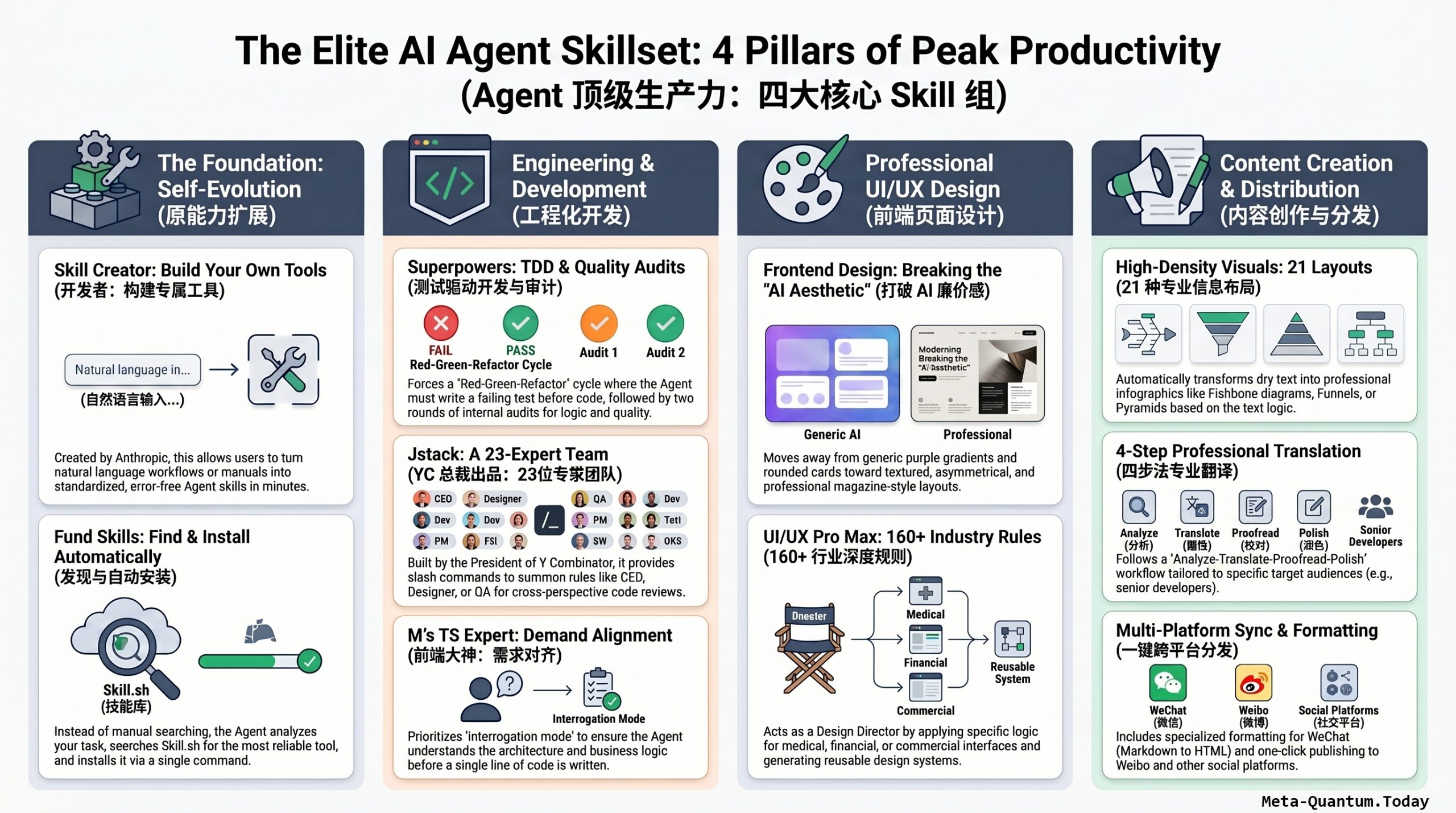
Stop debating Codex versus Claude Code. After testing dozens of AI agents, the real determinant of productivity isn’t the agent tool itself — it’s the Skills you configure. The wrong Skills mean wasted potential, no matter how powerful the agent. Here are the four essential Skill groups, covering meta-capability expansion, engineering workflows, frontend design, and content creation — all platform-agnostic, ready to deploy wherever you go.
别再纠结 Codex 还是 Claude Code 了。在实测数十个 AI Agent 之后,真正决定生产力上限的,并不只是 Agent 工具本身,而是你配置的 Skill。Skill 没配对,换再强的 Agent 也是在浪费时间。以下四组 Skill 覆盖原能力扩展、工程化开发、前端设计与内容创作,完全不挑平台,装上即用。
Group 1: Meta-Skills — The Foundation of Everything
These two Skills don’t do specific tasks. They exist to expand the agent’s capability boundary itself — and they’re the first thing you should install, on day one, globally.
第一组:原 Skill——一切能力的地基
这两个 Skill 并不负责具体的活儿,而是专门用来扩展 Agent 的能力边界——这是你第一天就应该打好的地基,建议全局安装。
Skill Creator
Building a custom Skill used to mean studying complex formats, debugging broken SKILL.md files, and hoping the output actually worked. Skill Creator eliminates all of that. Describe your workflow in plain language, or hand it an operations manual, and it drafts, tests, and iterates the Skill automatically — no documentation reading required. You can go from idea to working Skill in under a minute.
Skill Creator(Anthropic 官方出品)
以前自己做一个 Skill 特别麻烦,得先研究半天复杂格式,写出来还可能报错。有了 Skill Creator,你只需要像给同事交代工作一样,用大白话把你的流程说一遍,或者直接把操作手册丢给它——它会自动起草、测试、反复迭代,完全不用看开发文档,一分钟就能写出一个既标准又好用的 Skill。
How to use: Install globally, then select Skill Creator in your agent and describe your workflow step by step.
使用方式: 建议直接全局安装,在 Agent 里选中 Skill Creator,输入需求,一步步沟通即可。
Global Install + Practical Use Case |全局安装 + 实战用例
Step 1 — 安装 / Install
方法一(推荐):Plugin 命令安装
Anthropic 已将 Skill Creator 预装在 Claude Desktop 和 Claude Cowork 中,开箱即用。如果你使用 Claude Code,需要手动安装:
# 在 Claude Code 终端中运行
/plugin install skill-creator@anthropic-agent-skills
安装时会询问作用域 / When prompted, choose scope:
> User   ← 推荐 / Recommended (全局,所有项目可用)
  Project ← 仅当前项目
选择 User 即全局安装到 ~/.claude/skills/,所有项目随时可调用。
方法二:手动安装(备用)
# 手动创建目录并拷贝
mkdir -p ~/.claude/skills
# 然后将 skill-creator 文件夹放入该目录
验证安装 / Verify installation:
ls ~/.claude/skills/
# 应看到 skill-creator/ 文件夹
Step 2 — 实战用例 / Use Case Walkthrough
场景:将”YouTube视频总结”工作流封装为可复用 Skill
Scenario: Packaging a “YouTube Video Summary” workflow into a reusable Skill
打开 Claude Code,直接用自然语言描述:
Open Claude Code and describe in plain language:
你输入 / You type:
我想创建一个 Skill,用于总结 YouTube 视频。
工作流程如下:
1. 接收视频 URL 和文字稿
2. 生成结构化摘要,包含:引言、新功能/概念、
   相关主题、结论、关键要点、参考资料
3. 输出中英双语版本
4. 在结尾加上 Glasp 阅读链接

I want to create a Skill for summarizing YouTube videos.
Workflow:
1. Accept video URL and transcript
2. Generate structured summary with:
   Introduction, New Features/Concepts,
   Related Topics, Conclusion, Key Takeaways, References
3. Output bilingual (EN + 中文) version
4. Append Glasp reader link at the end
Skill Creator 的回应流程 / Skill Creator’s response flow:
[Skill Creator] 好的,我来帮你起草这个 Skill。
先确认几个细节:

1. 触发词偏好?(例如:用户说"总结这个视频"时自动启动)
2. 摘要长度偏好?(精简 / 详细)
3. 是否需要自动搜索 Glasp 洞察?

[Skill Creator] Got it. Let me draft this Skill.
A few quick questions first:

1. Trigger preference? (e.g., auto-activate when user says "summarize this video")
2. Summary length preference? (concise / detailed)
3. Should it auto-search Glasp for insights?
你回答 / You reply:
触发词:用户提供 YouTube URL + 文字稿时自动触发
长度:详细版
Glasp:是,自动搜索并引用

Trigger: auto when user provides YouTube URL + transcript
Length: detailed
Glasp: yes, auto-search and cite
Skill Creator 自动生成的 SKILL.md 结构 / Auto-generated SKILL.md structure:
---
name: youtube-bilingual-summary
description: >
  Summarize YouTube videos into structured bilingual (EN/中文)
  reports. Triggers when user provides a YouTube URL with
  transcript. Searches Glasp for related highlights and cites them.
triggers:
  - youtube url with transcript
  - summarize this video
  - 总结这个视频
version: 1.0.0
---

## Instructions

When activated:
1. Extract title, URL from user input
2. Search Glasp (site:glasp.co) for related insights
3. Generate structured summary:
   - Introduction / 引言
   - New Features & Concepts / 新功能与概念
   - Related Topics / 相关主题
   - Conclusion / 结论
   - Key Takeaways / 关键要点
   - References / 参考资料
4. Output full bilingual parity (EN paragraph → 中文段落)
5. Append: "Learn more on Glasp: <https://glasp.co/reader?url={URL}>"
Skill Creator 继续 / Skill Creator continues:
草稿已生成。正在运行内部测试...

✓ 触发词覆盖率:3/3
✓ 结构完整性:通过
✓ 双语格式:通过
⚠ 建议:加入 max_tokens 限制防止超长输出

是否接受这个版本,或需要调整?

Draft complete. Running internal tests...

✓ Trigger coverage: 3/3
✓ Structure integrity: pass
✓ Bilingual format: pass
⚠ Suggestion: add max_tokens guard to prevent oversized output

Accept this version or would you like adjustments?
你输入 / You type:
接受,加入 token 限制建议,然后保存。
Accept. Apply the token limit suggestion and save.
✓ 已保存至 ~/.claude/skills/youtube-bilingual-summary/
  今后在任何项目中,提供 YouTube URL + 文字稿即可自动触发。

✓ Saved to ~/.claude/skills/youtube-bilingual-summary/
  From now on, provide any YouTube URL + transcript
  and this Skill activates automatically across all projects.
效果对比 / Before vs After
| 没有 Skill / Without Skill | 有 Skill / With Skill | |
|---|---|---|
| 每次需要 | 重新写完整 prompt | 直接丢 URL + 文字稿 |
| 格式一致性 | 每次略有不同 | 完全标准化 |
| 双语输出 | 需要手动指定 | 自动执行 |
| Glasp 引用 | 容易遗漏 | 内置流程 |
| 时间成本 | ~5分钟/次 | ~30秒/次 |
核心要点 / Key Point
Skill Creator 的核心洞见是:将 Skill 视为给 Agent 的入职指南——它赋予 Agent 那些单靠训练数据无法获得的程序性知识,让重复工作流一次定义、永久复用。
一句话总结: 你只需像给同事交代工作一样描述流程,Skill Creator 负责把它变成一个标准化、可复用、跨项目的 Agent 能力模块。
In one line: Describe your workflow like briefing a colleague — Skill Creator turns it into a standardized, reusable, cross-project agent capability.
Find Skills
Don’t think of this as a search plugin you manually query. The real power is this: assign the agent a task it doesn’t know how to do, and it finds the right tool itself. Ask it to design a UI, and if it lacks the capability, it automatically decomposes your request into search keywords, queries the skills.sh marketplace, evaluates Skills by install count and author reputation, and presents you the best options — with one-line installation ready to go.
别把它当成一个普通的搜索插件。真正的用法是:直接给 Agent 布置任务,它会自己发现能力缺口,然后主动去找工具。让它做 UI 设计,发现自己不会,它就会自动拆解需求关键词,去 skills.sh 平台查安装量和作者可信度,挑出最好的选项供你选择,选定后还能一行命令直接安装。
The complementary roles are clear: Skill Creator builds new tools; Find Skills finds existing ones. Together, they dramatically raise your agent’s capability ceiling.
两者分工明确:Skill Creator 负责”自己造工具”,Find Skills 负责”去外面找现成的”。配合使用,Agent 的能力上限将大幅提升。
Group 2: Engineering Workflow Skills
These three Skills share one core mission: eliminating the code hallucination problem — logic that looks right but doesn’t actually run, or code that passes CI but explodes in production.
第二组:工程化开发 Skill
这三个 Skill 共同指向一个核心目标:终结代码幻觉——那种看似逻辑闭环、实则无法落地的代码,以及 CI 能过但一上线就可能爆炸的工程隐患。
Superpowers
Superpowers takes Test-Driven Development (TDD) and makes it a hard rule the agent must follow, not an optional practice. The enforced cycle is strict: write a failing test first (proving the feature doesn’t exist yet), write the minimum code to make it pass, then refactor. After implementation, it automatically runs two internal audit rounds — one checking requirement alignment, one scrutinizing code quality.
Superpowers 将测试驱动开发(TDD)变成 Agent 必须遵守的硬规则,而非可选项。强制循环严格执行:先写一个必然失败的测试(证明功能还未实现),再写最少量的代码使其通过,最后优化重构。完成后自动开启两轮内部审计:一轮核对需求对齐,一轮专盯代码质量。
The workflow: brainstorm → design doc → break into small tasks with clear verification criteria → subagent execution → merge decision (commit / branch / discard).
整体工作流:头脑风暴 → 设计文档 → 拆解成分钟级小任务(每个都有明确验收标准)→ 子 Agent 自主执行 → 合并决策(直接提交 / 保留分支 / 丢弃)。
This “slow thinking” mode costs slightly more time upfront, but because the first pass reaches 80+ quality, it eliminates countless debug cycles downstream — saving tokens and money long-term.
这种”慢思考”模式看似多花了点时间,但因为第一遍就能把代码写到 80 分以上,省掉了后续无数次反复 debug,长期来看反而更省 token,也更省钱。
jStack(作者:YC 总裁 Garry Tan)
If Superpowers handles engineering discipline, jStack handles product and business rigor. It embeds 23 distinct expert roles inside the agent — CEO, designer, release engineer, QA specialist, and more — all callable via slash commands. The agent stops being a solo operator and becomes a full team.
如果说 Superpowers 负责工程纪律,jStack 负责的则是产品与商业严谨性。它在 Agent 内置了 23 个专家角色——CEO、设计师、发布工程师、QA 专员等——通过斜杠命令直接调用,让 Agent 从单兵作战变成一支完整团队。
Key commands worth knowing:
几个值得重点关注的命令:
/office-hours— Before writing a single line of code, the agent asks six sharp questions to kill bad assumptions dead/plan-ceo-review— Examines the plan from a CEO’s strategic perspective for better solutions/review— Finds not just bugs but production-level engineering risks CI won’t catch/qa— Actually opens a browser and clicks through the interface like a real human tester/ship— Runs tests, pushes code, opens PRs — the full release pipeline in one command/office-hours——动手写代码前,AI 像严厉导师一样反问六个最尖锐的问题,掐死不靠谱假设/plan-ceo-review——从 CEO 高度审视计划,寻找更优解/review——不只找小 bug,更盯着 CI 能过但上线可能爆炸的工程隐患/qa——真实打开浏览器,像真人测试员一样点击验证/ship——自动跑测试、推代码、开 PR,整套发布动作一气呵成
Garry Tan has measured his own output: his code production in 2026 is 240× what it was in 2013. That’s not lines of code — it’s what one person can now deliver compared to a small team.
Garry Tan 统计过:2026 年他的代码产出是 2013 年的 240 倍。这不是说 AI 写的行数多就厉害,而是同样的需求,他一个人现在能顶一支小团队在干活。
Matt Pocock’s Frontend Skill Set (TypeScript Evangelist)
This set addresses a different failure mode: misalignment between human and agent, where the agent builds the wrong thing confidently. Matt’s diagnosis covers three patterns — misunderstood requirements, unrunnable code, and maintainability debt from missing architectural planning. The Skills enforce a discipline of front-loading clarity.
Matt Pocock 前端 Skill 套件(TypeScript 布道者)
这套工具针对另一种失败模式:人与 Agent 之间的沟通对不齐——Agent 满怀信心地造出了你不想要的东西。Matt 总结了三种典型困境:理解偏差(没听懂需求)、执行失败(代码跑不通)、架构隐患(能跑但后期维护痛苦)。这套 Skill 的核心逻辑就是前期多花几分钟对齐,避免后期花几小时救火。
Key commands:
重点命令:
/growmeseries — Interrogates vague requirements relentlessly. “Add a login feature” gets questioned until the real need emerges: SSO-based multi-tenant authentication./triage— Issue triage. Prioritizes what’s actually blocking progress versus cosmetic fixes./improve— Architectural health check. Run it every few days to get a global view of where the codebase is quietly accumulating future pain./growme系列——对模糊需求持续追问,直到真正需求浮现:”想加登录功能”→追问后发现真正要的是 SSO 多租户登录/triage——Issue 分诊,区分真正阻塞进度的核心问题与细枝末节/improve——代码库架构急救包,建议每隔几天跑一次,从全局视角找出将来越来越难改的地方
Group 3: Frontend Design Skills
This was early AI’s most embarrassing failure mode. Every AI-generated UI looked identical: rounded cards, Inter font, blue-purple gradient background, standard button styles. Ten interfaces, twelve clones. Two Skills fix this.
第三组:前端页面设计 Skill
这是早期 AI 编程最薄弱的领域之一。AI 生成的界面永远是那些固定套路:圆角卡片、蓝紫色渐变背景、特定字体和按钮样式。网上看到的 AI 生成界面,十个里有十二个长得一样。以下两个 Skill 专门解决这个问题。
Frontend Design (Official Anthropic)
This Skill washes out the generic AI aesthetic at the root. Rather than mechanically applying components, it reasons through texture, visual weight, and breathing room based on your product’s specific character. Give it a specific style brief — “gritty, industrial feel with some editorial hardness” — and it handles font proportions, whitespace rhythm, and layout logic with genuine care. The result: UI that reads as intentional craft, not generated slop.
Frontend Design(Anthropic 官方出品)
这个 Skill 从根源上洗掉 AI 审美痕迹。它不机械套用组件,而是根据你的产品调性推敲质感纹理、视觉比重和留白节奏。你给它一个具体风格要求——”杂质感带点硬核感的页面”——它在字体比例、模块间留白和布局逻辑上都会处理得很到位。结果:UI 从”一眼 AI”变成”手作设计”,从单纯能看变成真正耐看。
UIUX Pro Max
Where Frontend Design provides creative direction, UIUX Pro Max provides professional system design. It embeds 160+ industry-specific rule sets — so when you’re building a fintech or healthcare interface, it tells you exactly which color systems project trust, which typography signals expertise, and which design patterns are commercially off-limits. It also generates a persistent design system you can hand to the agent on future projects, eliminating from-scratch style decisions every time.
Frontend Design 提供创意方向,UIUX Pro Max 则提供专业系统设计。它内置 160+ 行业深度规则集——做金融或医疗界面时,它会明确告诉你什么配色能体现安全感、什么字体更显专业、哪些设计在商业场景里是禁忌。它还能生成可持久化复用的设计系统文件,下次新项目直接丢给 Agent 调用,不用每次从零打磨风格。
The division of labor is clean: Frontend Design makes the interface striking; UIUX Pro Max makes the product professional. Together, the cheap AI look is gone for good.
两者分工明确:Frontend Design 负责让画面出彩,UIUX Pro Max 负责让产品更专业。有了它们,AI 输出再也不会有那种廉价感。
Group 4: Content Creation Skills (Baoyu’s Toolbox)
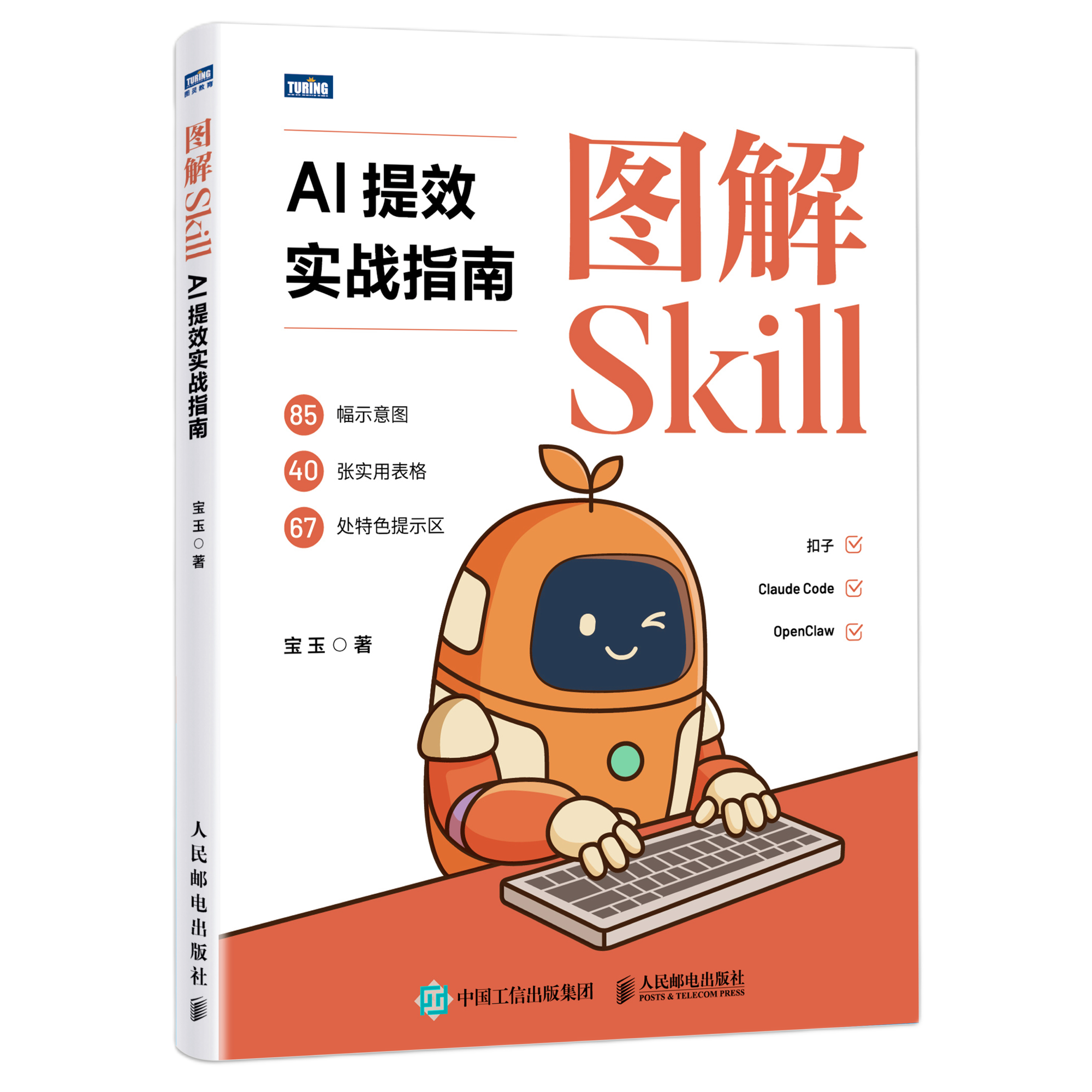
If you use agents for content creation, this collection deserves a strong recommendation. It covers the full pipeline from production to publication — and it closes the loop entirely inside the agent.
第四组:内容创作 Skill(宝玉老师工具箱)
如果你用 Agent 做内容创作,这套工具箱强烈推荐。它打通了从内容生产到跨平台发布的全链路,整套流程全部在 Agent 内闭环完成。
Cover Image Skill
A five-dimensional control system: composition type, color palette, rendering style, typography, and emotional tone — all precisely tunable. With 77 preset combinations, every output feels purpose-built for its article rather than randomly generated.
封面图 Skill
五维控制系统:构图类型、色调方案、渲染风格、文字排版、情绪基调——全部精准可调。77 种预设组合,让每一张封面彻底告别开盲盒的随机感,出来的效果像是为你的文章量身定制的专业设计。
Infographic Skill
21 built-in professional layouts: fishbone diagrams for root cause analysis, funnel charts for conversion flows, pyramid charts for hierarchical structures, and more. More intelligently, it reads the logical structure of your copy and recommends the most appropriate layout automatically. What used to take half a day in design software now produces publication-quality visuals in seconds.
信息图 Skill
21 种专业信息布局:分析原因的鱼骨图、做转化的漏斗图、梳理层级的金字塔图……应有尽有。更聪明的是,它能自动读懂你文案里的逻辑结构,直接推荐最合适的布局。以前要在设计软件里磨半天的信息大图,现在几秒钟就能产出出版级可视化成果。
Xiaohongshu Image Skill
Automatically decomposes long-form articles into 1–10 carousel cards in an illustrated style. Supports 11 visual styles and 8 layout modes (comparison, list, flowchart, and more), generating platform-native image-text content that fits Xiaohongshu’s content conventions perfectly.
小红书 Image Skill
将长文章自动拆解为 1-10 张卡通风格的轮播卡片。支持 11 种视觉风格和 8 种排版模式(对比、清单、流程等),快速生成符合小红书平台排版习惯的图文内容。
Markdown to HTML Skill
Solves the specific pain of publishing formatted content to WeChat Official Account, which doesn’t support Markdown. Automatically handles code syntax highlighting, math formulas, and — most usefully — converts inline links to footnote-style references at the bottom of the article, eliminating the broken-link problem endemic to WeChat articles.
解决在不支持 Markdown 的微信公众号上保留精致排版的痛点。自动处理代码高亮和数学公式;最实用的是,它能把文中的普通外链自动转为文末底部引用,彻底解决公众号里链接打不开或被截断的尴尬。
Translation Skill
Offers a publication-grade mode that doesn’t just translate — it runs a full four-step process: analysis → translation → proofreading → polishing. Crucially, you can specify your audience. Tell it your readers are senior engineers, and it automatically strips redundant explanations, producing prose that reads like it was written by an industry insider rather than a translation engine.
翻译 Skill
提供正式出版级模式,不是直接翻译,而是走完整四步流程:分析→翻译→校正→润色。关键特性是可以指定读者群体——告诉它”读者是资深开发者”,它会自动省略冗余解释,翻译出来的语气读起来就像真正的圈内人写的。
Publish to WeChat / Weibo Skills
One-click cross-platform distribution once your content is ready. Supports both long-form articles and image-plus-summary post formats. All the complex backend operations become a single agent command — from local draft to final publication, entirely inside the agent environment.
发布微信 / 发布微博 Skill
内容准备完毕后,一键跨平台分发。支持长文章形式和图文摘要的贴图模式。所有复杂的后台操作全变成 Agent 里的一行指令,从本地草稿到最终发布,整套流程在 Agent 内直接闭环。
Conclusion: Build Your Own Skill Stack
结论:打磨属于自己的 Skill 体系
The four groups above represent a complete productivity architecture for the AI agent era:
以上四组 Skill 构成了 AI Agent 时代完整的生产力架构:
- Meta-Skills lay the foundation — Skill Creator + Find Skills
- Engineering Skills hold the quality line — Superpowers + jStack + Matt Pocock
- Design Skills raise the aesthetic bar — Frontend Design + UIUX Pro Max
- Content Skills close the full loop — Baoyu’s Toolbox
- 原 Skill 打地基——Skill Creator + Find Skills
- 工程 Skill 守底线——Superpowers + jStack + Matt Pocock 套件
- 设计 Skill 提质感——Frontend Design + UIUX Pro Max
- 内容 Skill 闭环流程——宝玉老师工具箱
The Skills shared here are a starting point — not a complete list. The real key is to observe your own workflow, identify your actual friction points, and build the Skill configuration that fits you specifically. That’s where the real productivity ceiling is set.
这里分享的 Skill 只是个开始,真正的关键是根据自己的工作流程和使用场景,打磨出真正适合自己的 Skill 配置体系。那才是你生产力真正的天花板所在。
Key Takeaways / 核心要点
- Skill configuration, not agent choice, determines your productivity ceiling / Skill 配置而非 Agent 选择,才是生产力上限的决定因素
- Install Skill Creator + Find Skills globally on day one / Skill Creator + Find Skills 应第一天全局安装
- Superpowers enforces TDD — first-pass quality saves tokens long-term / Superpowers 强制 TDD,一次写好长期更省成本
- jStack’s 23 expert roles give one agent the cross-audit capability of a full team / jStack 23 个专家角色让单人 Agent 具备团队级交叉审计能力
- Frontend Design is the official antidote to AI aesthetic homogenization / Frontend Design 是打破 AI 审美同质化的官方解法
- Baoyu’s Toolbox automates the entire content pipeline from creation to publication / 宝玉老师工具箱打通从内容生产到跨平台发布的全链路
References / 参考资料
- Superpowers GitHub: https://github.com/obra/superpowers
- Skills 发现平台 / Skills Marketplace: https://skills.sh
- Best Claude Code Skills 2026: https://www.firecrawl.dev/blog/best-claude-code-skills
- Best Frontend Skills for Claude Code: https://www.agensi.io/learn/best-claude-code-frontend-skills
- Superpowers + jStack Skills Stack Analysis: https://dev.to/imaginex/a-claude-code-skills-stack-how-to-combine-superpowers-gstack-and-gsd-without-the-chaos-44b3
- Top 10 Claude Code Skills 2026: https://composio.dev/content/top-claude-skills
- 小红书 Image Skill: https://github.com/op7418/guizang-social-card-skill
- 宝玉老师工具箱
- UIUX Pro Max
- Frontend Design Skills
