

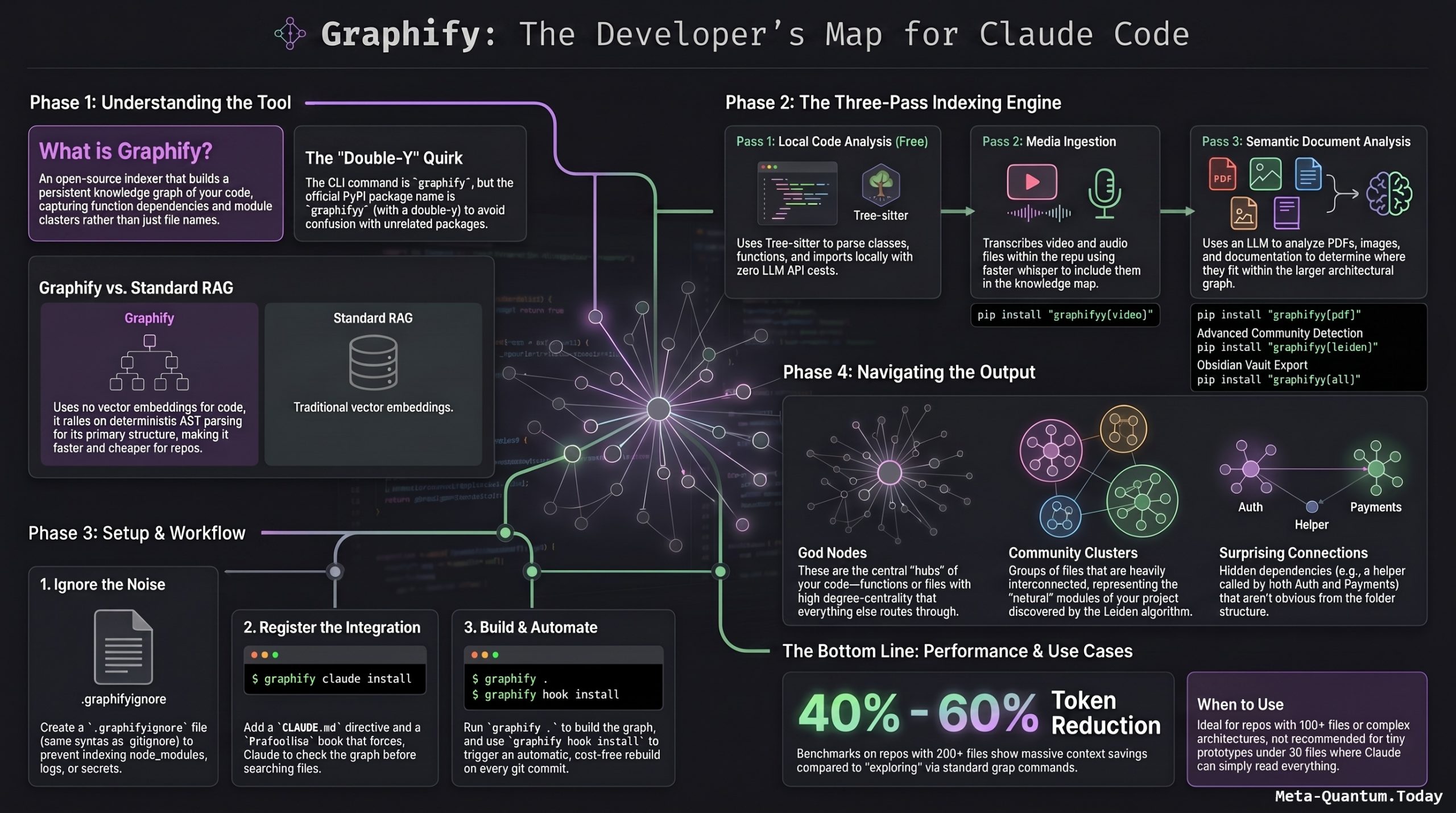
Introduction
One of the most persistent frustrations with AI coding assistants like Claude Code is their lack of persistent memory about a codebase. Every new session starts from scratch — Claude has no idea how your project is structured, so it resorts to grepping through files like a brute-force search engine. This video introduces Graphify, a fast-growing open source tool (nearly 60,000 GitHub stars at the time of filming) that solves this by converting any repository into a queryable knowledge graph — giving Claude Code a map instead of a maze. The result: more accurate answers at significantly lower token costs.
A complete practical guide to Graphify — from first principles through a working use case.
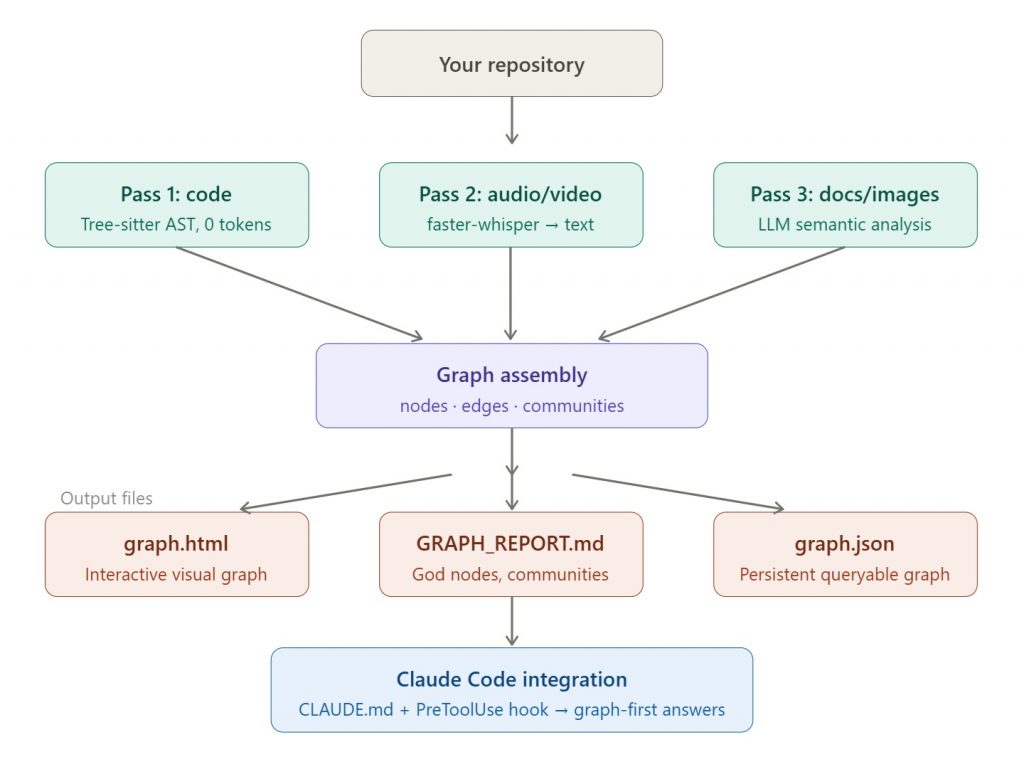
What Graphify is (and isn’t)
Graphify is an open-source tool that fixes Claude Code’s stateless file-scanning problem by building a persistent knowledge graph of your code, then making Claude read the graph before grepping. In one sentence: it indexes your codebase into a queryable knowledge graph that captures not just “which files exist” but “which functions depend on which,” “which modules are central (god nodes),” and “which files form clusters of related concern (communities).”
It is not a RAG system (no vector embeddings), not a search engine, and not an MCP server (though one is on the roadmap). It’s a build-time indexer that produces artifacts Claude reads.
Important naming quirk: The official PyPI package name is graphifyy (double-y). The CLI command you actually run is still graphify. Other graphify* packages on PyPI are not affiliated.
Prerequisites
- Python 3.10 or higher (Python < 3.14)
- pip, pipx, or uv
- Claude Code (or any other supported coding assistant — Cursor, Codex, Gemini CLI, Aider, etc.)
- A project folder with at least ~50–100 files to make the investment worthwhile
Installation
The recommended install methods are:
# Option A — uv (recommended, puts graphify on PATH automatically)
uv tool install graphifyy

# Option B — pipx (isolated, global)
pipx install graphifyy

# Option C — pip (may need PATH setup)
pip install graphifyy
For PDF, video, Office file, and advanced community detection support, install optional extras:
| Group | Command | What it adds |
|---|---|---|
pdf | pip install "graphifyy[pdf]" | PDF and HTML document ingestion |
video | pip install "graphifyy" | Video/audio transcription via faster-whisper |
office | pip install "graphifyy[office]" | Word and Excel file support |
leiden | pip install "graphifyy[leiden]" | Advanced community detection (Python < 3.13) |
svg | pip install "graphifyy[svg]" | Static SVG graph export |
watch | pip install "graphifyy[watch]" | Real-time file system monitoring |
all | pip install "graphifyy[all]" | Everything above |
Verify your install:
graphify --help
graphify --version
If graphify command is not found after installing, use python -m graphify --help as a fallback, or prefer pipx/uv tool install which handle PATH isolation automatically.
Step 1 — Create a .graphifyignore file
Before running anything, tell Graphify what to skip. Without this, it will waste time and tokens on node_modules, build artifacts, logs, and secrets.
The .graphifyignore syntax is identical to .gitignore. Example for a general project:
cat > .graphifyignore <<'EOF'
.git/
vendor/
node_modules/
storage/
bootstrap/cache/
public/build/
dist/
build/
coverage/
.env
*.log
*.sql
*.dump
*.zip
*.tar
*.gz
*.bak
EOF
For a Python project:
cat > .graphifyignore <<'EOF'
.git/
.venv/
venv/
__pycache__/
.pytest_cache/
.mypy_cache/
dist/
build/
.env
*.log
*.sqlite
*.db
EOF
Step 2 — Register the Claude Code integration
From inside your project root:
graphify install         # registers the skill with Claude Code
graphify claude install  # adds the always-on CLAUDE.md directive + PreToolUse hook
The Claude Code integration installs two things: a CLAUDE.md directive that tells Claude to read graphify-out/GRAPH_REPORT.md before answering architecture questions, and a PreToolUse hook in settings.json that fires before every Glob and Grep call. If a knowledge graph exists, Claude sees: “graphify: Knowledge graph exists. Read GRAPH_REPORT.md for god nodes and community structure before searching raw files.”
This is the difference between Claude wandering through 40 files and Claude navigating by a map.
Step 3 — Build your first graph
Navigate to your project folder and run:
cd /path/to/your/project
graphify .
Inside Claude Code, the equivalent is:
/graphify .
(On Codex, use $graphify . instead.)
After a successful run, your graphify-out/ directory contains:
graphify-out/
├── graph.html        ← interactive browser graph, click nodes and filter
├── GRAPH_REPORT.md   ← the key file: god nodes, communities, suggested questions
├── graph.json        ← persistent machine-readable graph for future queries
└── cache/            ← avoids reprocessing unchanged files on subsequent runs
GRAPH_REPORT.md is what Claude Code reads. It summarizes the most important nodes, cluster communities, surprising cross-file connections, and suggested questions — giving Claude a structured map without scanning raw files.
Step 4 — Ask Claude Code architecture questions
Once the graph is built, you can prompt Claude in natural language:
Use the Graphify report first. Explain the authentication flow.
Use graphify-out/GRAPH_REPORT.md before searching files.
Where is payment status updated?
Use the knowledge graph to trace how a user registration request
flows through this codebase.
Because of the PreToolUse hook installed in Step 2, Claude will automatically consult the graph even without these explicit prompts.
Step 5 — Set up auto-rebuild on commits
For a living codebase, you want the graph to stay current:
graphify hook install
This writes post-commit and post-checkout rebuild hooks. The rebuild is AST-only — no LLM calls, no API cost — it just re-parses what changed and updates the structural layer of the graph. Graph outputs like graph.json and GRAPH_REPORT.md are plain text, so they can be committed to git. After team members pull the changes, they immediately have the updated graph — architectural knowledge becomes versionable.
Simple walkthrough: a Python web project
Suppose you have a Flask API with 80 files. Here’s the complete workflow:
# 1. Install
pip install graphifyy

# 2. Navigate to project
cd ~/projects/my-flask-api

# 3. Create ignore file
cat > .graphifyignore <<'EOF'
.git/
venv/
__pycache__/
.env
*.log
*.db
EOF

# 4. Register Claude Code integration
graphify install
graphify claude install

# 5. Build the graph (first run — takes 30–120s depending on repo size)
graphify .

# 6. Inspect the report
cat graphify-out/GRAPH_REPORT.md

# 7. Set up auto-rebuild
graphify hook install
Inside Claude Code, you now ask:
/graphify explain
Which modules handle authentication, and how do they connect to the
user model?
Claude reads GRAPH_REPORT.md, identifies the relevant community cluster, looks at only the 2–3 files it needs, and answers — rather than grepping through all 80 files.
Understanding the output: nodes, edges, communities
The graph Graphify builds has three building blocks:
God nodes are the highest-degree concepts — the files or functions that everything else routes through. If your app.py is a god node, it means dozens of other modules depend on it. These are the most important places to understand first when approaching an unfamiliar codebase.
Communities are clusters of nodes that are heavily interconnected with each other and loosely connected to the rest. Think of them as the natural “modules” of your project, discovered automatically rather than inferred from folder names.
Surprising connections are cross-community edges that the graph detected as meaningful but that aren’t obvious from file structure — for example, a utility function in /helpers/ that is called by both the auth layer and the payment layer. These are the hidden dependencies that cause bugs when changed naively.
Token savings: what to realistically expect
Reported token savings from the maintainer’s benchmarks and independent tests range from 6.8x on code review tasks up to 49x on daily coding tasks in large repos. Your mileage depends heavily on repo size. Small repos under 30 files won’t see much benefit — Claude could just read everything. Large repos with 500+ files see the biggest win because the alternative is pathological grepping.
The video demo on the Open Design repository (203 files) showed approximately 60% token reduction — 80K tokens with Graphify versus 200K without.
When to use Graphify (and when not to)
Good fit: repos with 100+ files where Claude keeps grepping everything, codebases with non-obvious module boundaries, teams doing AI-assisted code review on large PRs, and anyone burning through budget on Claude API because context is bloated.
Not a good fit: tiny prototypes under 30 files where the overhead isn’t worth it, greenfield projects where the code is changing every hour and the graph goes stale between builds, and codebases that are mostly YAML or JSON config where Tree-sitter analysis adds little value.
Beyond code: Obsidian vault export
Graphify isn’t locked to code repositories. Running with the --obsidian flag on any folder (even one full of markdown files, PDFs, or research papers) produces a fully populated Obsidian vault instead of a code-oriented graph report. This positions Graphify as a flexible middle ground between a pure note-taking system and a full RAG infrastructure — useful for personal knowledge bases, documentation wikis, or research corpora.
Quick reference: key commands
| Command | What it does |
|---|---|
graphify . | Build graph on current directory |
graphify install | Register skill with your AI assistant |
graphify claude install | Add CLAUDE.md directive + PreToolUse hook |
graphify hook install | Auto-rebuild on every git commit (free, AST-only) |
/graphify query | Explicitly tell Claude to consult the graph for next answer |
/graphify explain | Ask Claude to explain a concept using the graph |
pip install --upgrade graphifyy | Keep current (Graphify is releasing rapidly) |
Video about /graphify
What Is Graphify and Why Does It Matter?
Graphify is an open-source, multi-modal knowledge graph builder designed specifically for AI coding assistants such as Claude Code, OpenAI Codex, and OpenCode. It combines Tree-sitter static analysis with LLM-driven semantic extraction to turn an entire repository — code, docs, papers, and diagrams — into a queryable graph.
The core idea is simple but powerful: instead of Claude scanning raw files every time you ask a question, it reads a pre-built structured map of your codebase. This map captures not just what files exist, but how functions depend on each other, which modules are central, and which clusters of files form cohesive logical communities.
The underlying problem it solves is that Claude Code has no persistent understanding of a codebase’s structure. Every conversation starts from zero — every question becomes a file-scan. Graphify fixes this by making that structural understanding persistent and reusable.
How Graphify Works: Three-Pass Architecture
Graphify builds its knowledge graph through three distinct passes, each targeting a different type of content:
Pass 1 — Code Structure (Zero tokens, fully deterministic) Tree-sitter parses source files and extracts classes, functions, imports, call graphs, and inline comments. This runs entirely locally with no LLM involved. It’s not AI guessing — it’s reading exactly what the code says.
Pass 2 — Audio & Video (if present) Any video or audio files in the repository are transcribed using faster-whisper and injected into the graph as text nodes.
Pass 3 — Docs, PDFs, and Images (LLM-assisted) This is where the language model performs semantic analysis — understanding what a document means and where it belongs in the larger graph. The video likens this to a lightweight RAG system, without full vector embeddings.
The output of all three passes feeds into a graph consisting of nodes (individual entities like functions, classes, or documents), edges (connections between them), and communities (clusters of related nodes). In the demo on the Open Design repository, Graphify produced 1,907 nodes, 3,447 edges, and 109 communities from 203 files.
The output includes an interactive graph.html, a one-page GRAPH_REPORT.md audit summarizing god nodes, surprising connections, and suggested questions, and a persistent graph.json that can be queried later without rereading all files. God nodes are the highest-degree concepts that everything routes through. Surprising connections are ranked cross-file or cross-modal edges, each with a plain-English explanation of why they exist.
Graphify vs. Graph RAG: Key Differences
A natural question the video addresses is how Graphify compares to graph-based RAG systems like Microsoft Graph RAG, LightRAG, or RAG Anything.
The two biggest differences are:
- No embeddings — Graphify does not use any embedding model. Graph RAG systems typically rely on vector embeddings to find semantically similar chunks. Graphify’s structural relationships are derived from code analysis and LLM semantic reasoning, not cosine similarity.
- Use case fit — Graphify is optimized for codebases, where structure and connections are well-defined. Graph RAG shines on large, unstructured document collections (e.g., thousands of policy PDFs) where relationships aren’t explicit and must be inferred from meaning alone.
That said, the video acknowledges the line is blurry: because Graphify’s third pass does lightweight semantic analysis on docs and images, it functions somewhat like a “RAG lite” for mixed-content repositories.
Claude Code Integration: The Always-On Hook
The deepest integration Graphify ships with is for Claude Code. One install command writes both a CLAUDE.md directive and a PreToolUse hook, so Claude consults the knowledge graph before every file-search tool call — not after. This means Claude navigates by structure (god nodes, communities, surprising connections) rather than defaulting to grepping every file.
Key commands demonstrated in the video:
/graphify .— runs Graphify on the current directorygraphify query/graphify explain— explicitly instructs Claude to consult the knowledge graphgraphify claude install— sets Graphify as an always-on hook (Claude uses it automatically)graphify hook install— auto-rebuilds the graph after each git commit (AST-only, zero API cost)
Graphify is platform-agnostic and works with Claude Code, Codex, OpenCode, OpenClaw, Cursor, Trae, Gemini, Aider, and others.
Token Savings: The Real-World Demo
The video’s most compelling section is a head-to-head comparison on the Open Design repository (an open-source version of Claude’s design tool). The same question — “Trace how a design request flows from the web app to a coding agent and back” — was asked with and without Graphify.
- Without Graphify: Claude spawned two explore agents, consuming roughly 200,000 tokens total.
- With Graphify: The same quality answer was delivered using approximately 80,000 tokens — about 40% of the cost.
The 70x savings figure circulating online is described as optimistic. A more realistic expectation for complex questions on large codebases is a 60% token reduction, which is still substantial — especially when you account for the persistent nature of the graph: once built, you can query it repeatedly without paying the upfront file-scan cost again.
Living Graph: Updates and Team Workflows
A practical concern for any real project is whether the knowledge graph stays current as code changes. The answer is yes. Running graphify hook install sets up an automatic rebuild after each git commit. The rebuild is AST-only — no LLM calls, no API costs — making it fast and free. The video also confirms this works correctly in multi-developer team setups, where two developers might be committing to the same repo in parallel.
Beyond Code: Obsidian Integration
Graphify isn’t limited to code repositories. Using the --obsidian flag, it can convert any folder — including one full of markdown files — into a fully populated Obsidian vault. The video teases a follow-up dedicated to this use case, positioning Graphify as a flexible tool that sits between a pure note-taking system (like Obsidian alone) and a full RAG infrastructure.
Conclusion
Graphify occupies a genuinely useful middle ground in the AI tooling ecosystem. It’s more structured than raw Obsidian notes, less infrastructure-heavy than a full Graph RAG deployment, and natively integrated with Claude Code in a way that requires minimal setup. The persistent knowledge graph it builds is the key innovation — it transforms Claude Code from a stateless file-scanner into an assistant that understands your codebase’s architecture and relationships.
Key Takeaways:
- Graphify converts any repo into a persistent, queryable knowledge graph via a three-pass pipeline (AST → audio/video → docs/images)
- The Claude Code integration uses a PreToolUse hook to make graph consultation automatic before every file search
- Real-world token savings of ~60% are achievable on large codebases (not the 70x claimed by some)
- The graph auto-updates after every git commit at zero API cost
- Works across platforms (Codex, Cursor, Gemini CLI, etc.) and supports non-code repositories via Obsidian export
- Best fit: large codebases with complex interdependencies; less ideal than Graph RAG for purely unstructured document collections
Related References
- Graphify Official Site & Claude Code Integration: https://graphify.net/graphify-claude-code-integration.html
- Graphify Knowledge Graph for AI Coding Assistants: https://graphify.net/knowledge-graph-for-ai-coding-assistants.html
- OpenClaw API — Graphify in Practice: https://openclawapi.org/en/blog/2026-04-12-graphify-knowledge-graph
- Graphify + code-review-graph Setup Guide (DEV Community): https://dev.to/mir_mursalin_ankur/graphify-code-review-graph-build-a-self-updating-knowledge-graph-for-claude-code-and-other-ai-j1m
- Graphify + Claude Code Token Savings Guide (CLSkills): https://clskillshub.com/blog/graphify-claude-code-integration
- Independent Review — Graphify on a Real Codebase: https://www.kevinkinnett.com/posts/graphify-review-claude-code-knowledge-graph/
- Claude Code integration docs: https://graphify.net/graphify-claude-code-integration.html
- PyPI package (graphifyy): https://pypi.org/project/graphifyy/
- GitHub repo: https://github.com/safishamsi/graphify
- DeepWiki installation guide: https://deepwiki.com/safishamsi/graphify/1.1-getting-started-and-installation
- Complete setup guide (AiOps School): https://aiopsschool.com/blog/complete-graphify-guide-install-use-with-codex-and-claude-code-and-build-knowledge-graphs-for-ai-coding/
- CLSkills token savings analysis: https://clskillshub.com/blog/graphify-claude-code-integration
