

Introduction
Unpacks one of the strangest developer stories of the year: DeepSeek TUI, an open-source terminal-native AI coding agent built around DeepSeek V4 that exploded onto GitHub in early May. According to the video, on May 6th the project reached the top of GitHub trending, gained 2,434 stars in a single day, and pushed past 10,200 total stars — having sat around 8,700 earlier the same morning. What started looking like “another DeepSeek wrapper” suddenly had developers on GitHub, Reddit, X, and Chinese tech communities all talking at once.
The premise is simple. Instead of opening a browser, copy-pasting code into a chatbot, and manually applying suggestions, DeepSeek TUI lets developers talk to DeepSeek directly inside the terminal — reading and editing files, running shell commands, searching the web, managing Git, applying patches, and coordinating sub-agents from a keyboard-driven interface. It sits in the same category as Claude Code, Aider, Klein, and OpenCode, except it’s heavily designed around DeepSeek V4 rather than trying to be a generic multi-model tool.
The Story Behind the Project
Part of the viral pull is the unlikely creator. The project is not an official DeepSeek product — it was built by Hunter Bound (GitHub handle: Bound), an independent American developer with a background in music education (B.M.E. from University of North Texas, 2015; M.M.E. from Southern Methodist University, 2019) who is now a second-year patent law student at SMU’s Dedman School of Law. He built DeepSeek TUI using AI-assisted coding — describing the workflow as an early version of AI self-iteration, where AI helps build the tool that later helps other people code with AI.
The project launched January 19, 2026 and by early May had already gone through dozens of releases — v0.8.13 landing on the morning of May 6th. Bound himself wrote on May 3rd that “two days earlier he was nobody” and that the previous two days had been the craziest of his life. He posted that he wanted to connect with Chinese developers, calling them “whale brothers” — which immediately became a small meme. He got a WeChat account, started learning Chinese, and the repo even ships a readme.zh-cn.md. The contributor list quietly includes Claude and Gemini — likely AI-assisted contribution traces.
DeepSeek TUI — Complete Setup & Showcase Guide
Comprehensive walkthrough: installation paths, API setup, config file, modes, key commands, skills/MCP wiring, and an end-to-end example session.
1. What You’re Installing
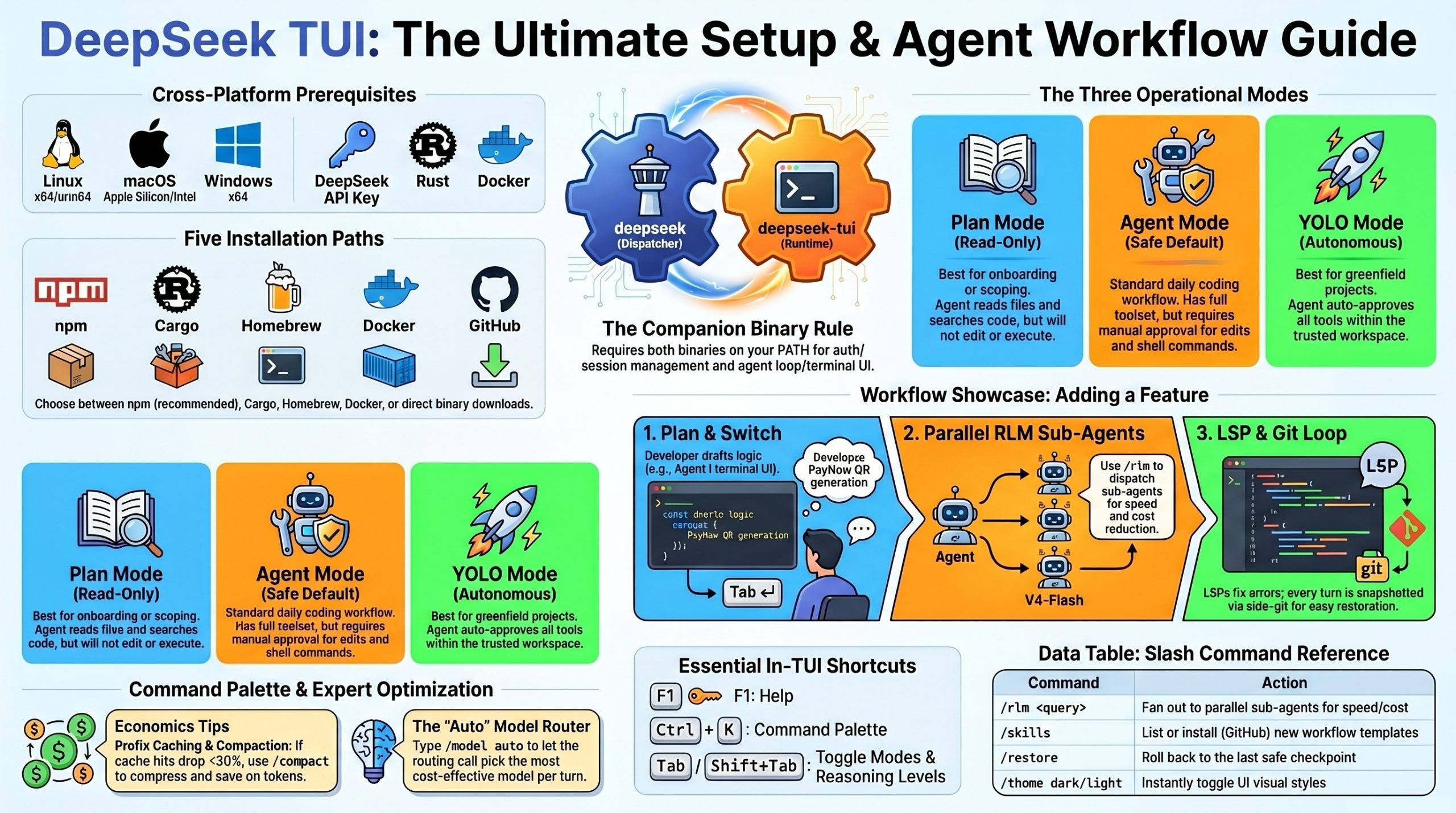
DeepSeek TUI is two binaries that work together:
| Binary | Role |
|---|---|
deepseek | Dispatcher CLI — auth, config, model selection, session management |
deepseek-tui | Runtime — agent loop, Ratatui terminal interface, streaming client |
If only one is on your PATH, you’ll get a MISSING_COMPANION_BINARY error. All install methods below place both correctly.
Official sources:
- GitHub:
github.com/Hmbown/DeepSeek-TUI(canonical, MIT-licensed) - npm:
deepseek-tui - crates.io:
deepseek-tuianddeepseek-tui-cli
2. Prerequisites
- A DeepSeek API key from
platform.deepseek.com - One of: Node.js (for npm), Rust 1.85+ (for Cargo), Homebrew (macOS), or Docker
- Linux (x64 / arm64), macOS (Apple Silicon / Intel), or Windows x64
- For Cargo from source: working C toolchain (
build-essentialon Linux, Xcode CLT on macOS, MSVC on Windows)
3. Installation Methods
Method A — npm (easiest, recommended)
The npm package is a thin installer that pulls down the matching prebuilt binary; it does not add a Node runtime dependency to the tool itself.
npm install -g deepseek-tui
This installs both deepseek and deepseek-tui binaries.
For mainland China users — set a release mirror to avoid GitHub download issues:
export DEEPSEEK_TUI_RELEASE_BASE_URL="<https://mirror.example.com/deepseek-tui-releases>"
npm install -g deepseek-tui
Method B — Cargo (build from source, most flexible)
# Both crates are required
cargo install deepseek-tui-cli --locked   # produces `deepseek`
cargo install deepseek-tui --locked       # produces `deepseek-tui`
For China users, point Cargo at TUNA mirror in ~/.cargo/config.toml:
[source.crates-io]
replace-with = 'tuna'
[source.tuna]
registry = “<https://mirrors.tuna.tsinghua.edu.cn/git/crates.io-index.git>”
Method C — Homebrew (macOS)
brew tap Hmbown/deepseek-tui
brew install deepseek-tui
If you hit Your Command Line Tools are too outdated, update Xcode CLT from the Apple Developer site, then re-run brew install.
Method D — Docker
docker run --rm -it \\
  -e DEEPSEEK_API_KEY="$DEEPSEEK_API_KEY" \\
  -v ~/.deepseek:/home/deepseek/.deepseek \\
  -v "$PWD":/workspace \\
  -w /workspace \\
  ghcr.io/hmbown/deepseek-tui:latest
The image is published for both linux/amd64 and linux/arm64.
Method E — Direct binary download
Grab deepseek and deepseek-tui from the GitHub Releases page for your platform, drop both into the same directory (e.g., ~/.local/bin/), then:
chmod +x ~/.local/bin/deepseek ~/.local/bin/deepseek-tui
# Verify checksums
shasum -a 256 -c deepseek-artifacts-sha256.txt
Sanity check
deepseek doctor      # checks PATH, both binaries, API connectivity
deepseek --version
deepseek models      # lists available models
4. First-Run Setup (API Key)
On first launch, the TUI prompts for your DeepSeek API key. You can also set it ahead of time:
# Option 1: interactive login (saves to config)
deepseek login

# Option 2: environment variable (one-shot or persistent)
export DEEPSEEK_API_KEY="sk-..."
deepseek-tui
The key is saved to ~/.deepseek/config.toml so it works from any directory without re-prompting or OS keychain dialogs.
5. Configuration (~/.deepseek/config.toml)
A practical starting config.toml:
# --- Auth ---
api_key       = "sk-..."                       # or use DEEPSEEK_API_KEY
base_url      = "<https://api.deepseek.com>"     # override for NIM / Fireworks / SGLang

# --- Model defaults ---
default_model      = "auto"                    # auto | deepseek-v4-pro | deepseek-v4-flash
default_thinking   = "high"                    # off | low | high | max
default_mode       = "agent"                   # plan | agent | yolo

# --- Cost guardrails ---
[cost]
warn_at_usd = 1.00 hard_cap_usd = 5.00 show_cache_stats = true # display cache hit/miss per turn # — Sub-agents (RLM) —
[rlm]
max_parallel = 8 # 1–16 default_child_model = “deepseek-v4-flash” escalate_to_pro_on_fail = true # — Tooling —
[tools]
allow_shell = true allow_git = true allow_web = true require_approval = [“shell”, “git_push”, “file_write”] # ignored in YOLO # — LSP diagnostics —
[lsp]
enabled = true servers = [“rust-analyzer”, “pyright”, “typescript-language-server”, “gopls”, “clangd”] # — Locale — language = “auto” # en | ja | zh-Hans | pt-BR | auto
Environment overrides that take precedence over the file:
DEEPSEEK_API_KEYDEEPSEEK_BASE_URLDEEPSEEK_PROFILE(lets you swap between named profile blocks in the TOML)
Alternate providers (still serving DeepSeek models, just different infra):
# NVIDIA NIM
base_url = "<https://integrate.api.nvidia.com/v1>"

# Fireworks AI
base_url = "<https://api.fireworks.ai/inference/v1>"

# Self-hosted SGLang
base_url = "<http://localhost:30000/v1>"
6. The Three Modes
Cycle with Tab / Shift+Tab. Pick the right mode for the task:
| Mode | What it does | When to use |
|---|---|---|
| Plan | Read-only inspection. Reads files, searches code, drafts a plan, but won’t edit or run anything. | Onboarding to a new repo, scoping a refactor, reviewing diffs |
| Agent | Default. Full toolset, but asks for approval on edits, shell commands, and git changes. | Daily coding work — the safe default |
| YOLO | Auto-approves tools inside a trusted workspace. | Greenfield projects, sandboxes, throwaway repos |
Shift+Tab (in addition to mode cycling) toggles reasoning depth: off → low → high → max. Type model auto or /model auto to let DeepSeek TUI pick model + thinking level per turn via a small deepseek-v4-flash routing call before each real turn.
7. Daily Commands & Keyboard Shortcuts
deepseek-tui                                   # interactive TUI in current dir
deepseek-tui -p "explain this in 2 sentences"  # one-shot prompt, no UI
deepseek-tui --yolo                            # start in YOLO mode
deepseek-tui --continue                        # resume the last interrupted session
deepseek-tui doctor                            # diagnose setup
deepseek-tui serve --http                      # HTTP/SSE server for automation
In-TUI keys:
| Key | Action |
|---|---|
F1 | Help overlay |
Esc | Back out of the current action |
Ctrl+K | Command palette |
Tab / Shift+Tab | Cycle mode / cycle reasoning level |
Ctrl+C | Cancel current turn (twice to quit) |
Slash commands inside the TUI:
| Command | Purpose |
|---|---|
/model auto or /model deepseek-v4-pro | Switch model |
/skills | List available skills |
/skill <name> | Activate a skill |
/skill new | Scaffold a new skill |
/skill install github:<owner>/<repo> | Install a community skill |
/rlm <query> | Fan out to parallel sub-agents |
/restore | Roll back to last checkpoint |
/revert turn | Undo the last turn’s changes |
/theme dark / /theme light | Toggle theme |
8. Skills & MCP Setup
Skills (workflow templates)
DeepSeek TUI discovers skills from these directories (in priority order):
# Workspace-local
.agents/skills → skills → .opencode/skills → .claude/skills → .cursor/skills

# Global
~/.agents/skills → ~/.claude/skills → ~/.deepseek/skills
Existing Claude Code skills work without modification — symlink or copy them in.
A skill is just a directory with a SKILL.md:
---
name: rust-pr-review
description: Use this when DeepSeek should review a Rust PR for safety, perf, and idioms.
---

# Rust PR Review Skill

When invoked:
1. Run `cargo clippy -- -D warnings` and report findings
2. Check `unsafe` blocks for justification
3. Look for unnecessary `clone()` calls
4. Verify error handling uses `Result` not `unwrap()`
5. Summarize in a bullet list grouped by severity
Install community skills:
# Inside the TUI
/skill install github:someuser/rust-skills
/skill update rust-pr-review
/skill trust rust-pr-review
MCP servers
Bootstrap the MCP directory and edit your config:
deepseek-tui setup       # creates skills + MCP scaffolding
deepseek-tui mcp init
Then in ~/.deepseek/config.toml:
[[mcp_servers]]
name    = "filesystem"
command = "npx"
args    = ["-y", "@modelcontextprotocol/server-filesystem", "/Users/coffee/projects"]

[[mcp_servers]]
name    = "github"
command = "npx"
args    = ["-y", "@modelcontextprotocol/server-github"]
env     = { GITHUB_PERSONAL_ACCESS_TOKEN = "ghp_..." }

[[mcp_servers]]
name    = "postgres"
command = "npx"
args    = ["-y", "@modelcontextprotocol/server-postgres", "postgresql://localhost/mydb"]
Any MCP server that works with Claude Code or other MCP-capable agents works here — it’s standard stdio transport.
9. Showcase Example — Adding a Feature to a Real Project
Walk-through of a realistic workflow: adding PayNow QR generation to a Yii web app (riffing on a stack you already work with).
Step 1: Open the project
cd ~/projects/koneindustries-web
deepseek-tui
Step 2: Start in Plan mode (Tab until “Plan” shows)
You: I need to add a
PayNowQRGeneratorservice that generates EMV-compliant QR strings from amount + merchant UEN + reference number. Look at the existingservices/folder, propose where this belongs, and draft a plan.
DeepSeek TUI streams its reasoning, scans services/, reads composer.json, and returns:
PLAN
1. Create services/PayNowQRGenerator.php following the existing service pattern
   (see services/PaymentNotifier.php — uses constructor DI, has interface)
2. Add IPayNowQRGenerator interface in services/contracts/
3. Implement EMV-Co TLV encoding helper as private method
4. Add CRC-16/CCITT-FALSE checksum (last 4 chars of the QR string)
5. Wire into config/main.php Yii component map
6. Unit tests in tests/unit/services/PayNowQRGeneratorTest.php
   covering: valid UEN, edge amounts, CRC verification

Estimated changes: 3 new files, 1 edit. ~280 LOC.
Step 3: Switch to Agent mode (Tab)
You: Looks good, proceed.
The agent now starts requesting tool approvals one at a time:
[approval needed] file_write: services/contracts/IPayNowQRGenerator.php
> Approve? (y/n/edit)
You hit y for each step, or edit to tweak the diff before applying. Watch the live reasoning stream as it works through the EMV TLV format.
Step 4: Use RLM for the test phase
When it’s time to write tests, you fan out:
You:
/rlm Generate test cases for PayNowQRGenerator covering: valid SG UEN, malformed UEN, amount precision (0.01 vs 0.001), max amount, empty reference, CRC verification, EMV field ordering. Each child writes one test method.
DeepSeek TUI dispatches 8 V4-Flash sub-agents in parallel, each producing one test method. Results stream back into the transcript. Cost shows roughly 1/3 of what V4-Pro would have cost for the same volume of work.
Step 5: LSP-driven fix loop
After file edits, the integrated pyright/typescript-language-server/etc. (here PHP via a configured LSP) feed diagnostics back into the model’s context. The agent sees errors and proposes fixes without you re-prompting.
Step 6: Commit via the rollback-aware Git tool
You: Commit these changes with a message following our conventional-commits style.
The agent runs git diff, drafts the message, asks for approval, then commits. Behind the scenes, a side-git mechanism has already snapshotted every turn into a separate ledger that doesn’t touch your project’s .git/ — so if anything went sideways, /restore rolls back without polluting your real history.
Step 7: Save and resume tomorrow
Ctrl+C twice to quit
Tomorrow:
cd ~/projects/koneindustries-web
deepseek-tui --continue
The persistent task queue, session transcript, and any unfinished background tasks all come back.
10. Cost & Economics Tips
- Watch the cache stats panel. DeepSeek V4 prefix caching is real — if cache hit % drops below 30% on long sessions, run
/compactto compress old tool outputs before paying for new turns. - V4-Flash for fan-out, V4-Pro for hard reasoning. Default
default_child_model = "deepseek-v4-flash"for RLM. At ~$0.14/M input and $0.28/M output (discounted rate), 16 Flash children typically cost ~1/3 of one Pro turn doing the same volume of work. - The 75% Pro discount is time-limited — currently valid until 15:59 UTC on 31 May 2026, after which the cost estimator reverts to base rates. Set
[cost] hard_cap_usdto fail-stop before bills surprise you. - Use
automodel selection for mixed workloads — the cheap router call decides per turn whether Flash or Pro is needed.
11. Troubleshooting Quick Reference
| Symptom | Fix |
|---|---|
MISSING_COMPANION_BINARY | Both deepseek and deepseek-tui must be on PATH; reinstall via npm |
Your Command Line Tools are too outdated (macOS Homebrew) | Update Xcode CLT from Apple Developer site, re-run brew install |
| npm postinstall download fails | Set DEEPSEEK_TUI_RELEASE_BASE_URL to a mirror; transient failures are now retried automatically (recent versions) |
glibc version too old (Linux) | Use Docker image, or upgrade to Ubuntu 22.04+ / Debian 12+ |
| Cache hit rate degrading on long sessions | Run /compact; v0.8.13+ shrinks old tool outputs locally before paid summarization |
| Agent stuck in a loop | Fixed: third repeat of same tool+args triggers a correction message; eight failures stop it |
| Can’t see reasoning stream | Set default_thinking = "high" and use deepseek-v4-pro — Flash doesn’t stream reasoning |
| Want HTTP API instead of TUI | deepseek-tui serve --http then POST to the local SSE endpoint |
Video about DeepSeek TUI
Architecture & New Features
Dual-Binary Rust Architecture
Under the hood, DeepSeek TUI is a native Rust application — not Electron, not a Python daemon, not a Node process. It splits into two binaries:
- DeepSeek Dispatcher CLI — handles authentication, configuration, model selection, session management
- DeepSeek TUI Runtime — handles the agent loop and the Ratatui-based terminal interface
Both must run together, or you get a “missing companion binary” error. Installation works via npm install -g deepseek-tui, Cargo (separate installs for deepseek-tui-cli and deepseek-tui), or Homebrew on macOS — with recent fixes for Windows path separators and arm64 Linux binaries.
DeepSeek V4-Native Design
Most coding apps that “support DeepSeek” just point an API client at it. DeepSeek TUI is designed around V4’s specific strengths:
- 1M token context window — enables long working sessions
- Cache hit/miss tracking — so developers can see when cached input is being used at lower cost
- V4 Flash for cheap parallel work, V4 Pro for stronger reasoning
- Live reasoning stream — V4 Pro can send its reasoning separately from the final answer, and DeepSeek TUI displays that reasoning directly in the terminal, so you watch the model think instead of waiting on a final blob
Context Compression & Loop Protection
v0.8.13 added a smarter cleanup system: instead of paying the AI to summarize everything, the tool first shrinks old tool results itself — keeping a one-line version of huge command outputs and preserving the newest important data. If that’s enough, it skips the paid AI summary entirely.
It also watches for the classic stuck-agent failure mode. If the same tool with the same arguments appears for the third time in one user request, it inserts a correction message and stops the repeat. If a tool keeps failing, it warns on the third try and stops on the eighth.
Three Operating Modes
- Plan mode — read-only inspection, no changes
- Agent mode — full toolset, but asks for approval on edits, commands, Git changes
- YOLO mode — auto-execution inside trusted projects (with recent fixes ensuring Git commands aren’t approved too easily)
Users can also type model auto for automatic model selection, and use Shift+Tab to cycle between no reasoning, high reasoning, and maximum reasoning.
RLM and the Sub-Agent Economics
The feature that makes DeepSeek TUI feel less like a Claude Code clone and more like its own thing is RLM (/rlm query). Instead of routing everything to one main model, it splits work across 1 to 16 smaller sub-agents, usually running on the cheaper V4 Flash model — one inspecting a file, another checking a different approach, another researching, another bug-hunting. Subtasks needing stronger reasoning get escalated to V4 Pro. The idea is inspired by Alex Jiang’s RLM work and Sakana AI’s novelty search research, repurposed into something practical for coding.
The cost angle is the real selling point. V4 Flash runs around $0.14/M input and $0.28/M output at the discounted rate, and running up to 16 V4 Flash subtasks costs roughly 1/3 of using Pro for similar work. For developers watching API bills, that’s serious.
This sub-agent approach mirrors a broader shift across agentic coding tools — developers building features in existing codebases are increasingly running 5-10 sub-agents in parallel inside Claude Code to ship faster, and understanding how sub-agents work and running specialized agents in the background is becoming a critical skill whether you’re vibe-coding or doing experienced agentic development. DeepSeek TUI is essentially porting that pattern onto a much cheaper inference substrate.
The Surrounding Ecosystem Features
Beyond the core agent loop, DeepSeek TUI ships features built for serious daily use:
- MCP (Model Context Protocol) support — plugs into outside tools and services
- Skills — small instruction packages teaching the agent how to handle specific tasks; community skills installable straight from GitHub without a separate backend
- Session save & resume, checkpoints, rollback —
restoreandrevert turncreate project snapshots independent of normal Git - Persistent task queue — unfinished background tasks survive restarts
- Code diagnostics integration — Rust Analyzer, Pyright, TypeScript Language Server, gopls, clangd
- Persistent personal notes — preferences carry across sessions
- Localization — English, Japanese, Simplified Chinese, Brazilian Portuguese, with system-language auto-adapt
- HTTP/SSE serving —
deepseek serve-httpfor automated workflows without the full TUI
Conclusion & Key Takeaways
DeepSeek TUI is more than a viral GitHub moment — it’s a serious attempt to turn DeepSeek V4’s specific strengths (huge context, cheap cached tokens, V4 Flash pricing, V4 Pro reasoning) into a coherent terminal coding workflow, built by an unlikely solo creator using AI-assisted coding. Whether it stays a flash-in-the-pan or grows into something developers use daily is the open question.
Key takeaways:
- Model-native design beats generic wrappers. Building around V4’s cache pricing, reasoning stream, and Flash/Pro split produces a tool that feels purpose-built rather than retrofit.
- Sub-agent fanout is becoming table stakes. RLM’s 1-16 V4 Flash workers at ~1/3 the cost of equivalent Pro work shows the economic case for parallel cheap agents over single expensive calls.
- Loop protection and context compression matter more than features. The unglamorous work — stopping the agent at the third repeat, shrinking tool outputs before paying for summarization — is what separates a usable tool from an expensive toy.
- Solo developers + AI-assisted coding can ship category-relevant tools fast. A patent law student with a music degree shipping a Rust-based Claude Code competitor in months is the more interesting story than the stars themselves.
- The Plan / Agent / YOLO mode hierarchy with explicit approval gates is becoming the standard safety pattern for terminal coding agents — and the recent YOLO Git fix shows why permission rigor still requires active maintenance.
Related References
- GitHub: Hunter Bound’s DeepSeek TUI repository (handle: Bound)
- Ratatui — the Rust TUI library powering the interface
- Related Glasp readings on agentic coding patterns: How I Use 10 AI Agents in Claude Code to Build Features Faster and Stop Using Claude Code Like This (Use Sub-Agents Instead)
- DeepSeek API platform:
platform.deepseek.com - MCP spec:
modelcontextprotocol.io - Related Glasp reading on agentic coding patterns: How I Use 10 AI Agents in Claude Code — the RLM sub-agent fan-out pattern in DeepSeek TUI maps directly onto what’s described here for Claude Code.
