

Introduction
In this, the JavaScript Mastery team walks through building Ghost AI, a real-time collaborative system design workspace, without writing a single line of code by hand. Instead, the entire production-grade application is built by AI agents under strict human direction. The video’s central thesis is that the dividing line in 2026 isn’t between developers who use AI and those who don’t — it’s between developers who can think like senior engineers and use AI as an implementation engine, versus those who hand everything over to the agent and end up fighting an incoherent codebase by week three.
The build itself is impressive: Next.js 16, React 19, Liveblocks for real-time collaboration, Trigger.dev for background AI tasks, Clerk for authentication, Prisma with Postgres for data, and Vercel Blob for storage — all wired together, deployed, and demonstrably working with multi-user presence, AI-generated architecture diagrams, and downloadable Markdown specifications. Watch this video about building a full stack system.
Full Stack Systems Architecture: Building with Open Design Principles
What “Open Design” Actually Means in Systems Architecture
Open design in full stack systems architecture is the practice of building applications where the architecture itself is transparent, documented, and modifiable — not buried in someone’s head or scattered across Slack messages. It draws from open-source principles but applies them to system structure: clear boundaries, named contracts between layers, explicit invariants, and decisions that can be audited and challenged by anyone on the team (including AI agents).
The Ghost AI build from the video you summarized is essentially a case study in open design. Every architectural decision lives in a markdown file. Every layer has a defined role. Every long-running operation has a named home. Let me walk through how to build this way.
The Foundational Shift: From Implicit to Explicit
Traditional architecture often relies on tribal knowledge — the senior engineer “just knows” that auth tokens get verified before websocket connections, or that the canvas state shouldn’t go in the main database. Open design forces this knowledge into writing.
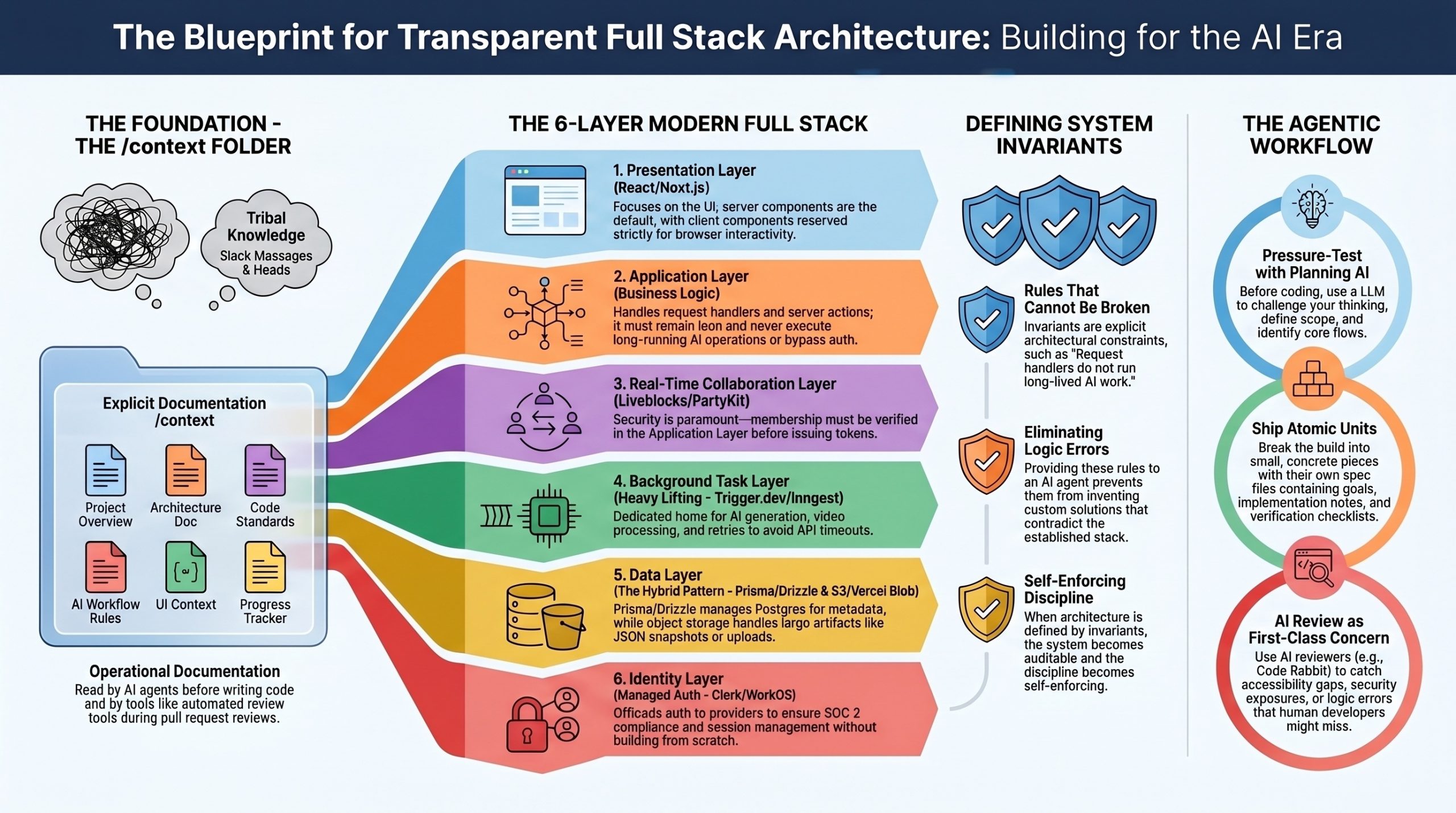
The practical result is a /context folder at the root of your project containing six files: a project overview, an architecture document, code standards, AI workflow rules, UI context, and a progress tracker. These aren’t aspirational documents — they’re operational. The agent reads them before writing code. New team members read them before contributing. Code Rabbit references them during reviews.
This mirrors the design-doc culture at Google, Amazon, and Netflix, where engineers spend weeks on RFCs before any code is written. The discipline scales down to solo developers and scales up to large teams precisely because the format is open and inspectable.
The Layered Architecture for Modern Full Stack
A well-designed full stack application separates concerns into distinct layers, each with a single responsibility:
- Presentation Layer handles what the user sees. In modern stacks this is React (or React 19 with server components in Next.js). The rule is strict: client components only when browser interactivity is genuinely needed. Everything else stays on the server.
- Application Layer holds business logic — request handlers, server actions, route handlers. This layer must stay lean. It should never run long operations, never make AI calls that take more than a few seconds, and never bypass authentication checks.
- Real-Time Collaboration Layer is increasingly its own layer in modern apps. Tools like Liveblocks, PartyKit, or Yjs handle websocket connections, presence, and shared state. The critical open-design rule: this layer must not be open by default. Membership verification happens in your application layer before a real-time token is ever issued.
- Background Task Layer handles anything that exceeds API route timeouts — AI generation, video processing, batch operations, retries. Trigger.dev, Inngest, or BullMQ live here. The frontend subscribes to status updates rather than waiting on a synchronous response.
- Data Layer uses Prisma or Drizzle as the ORM, with Postgres for relational data. A hybrid storage pattern keeps the database lean: structured metadata in Postgres, large artifacts (JSON snapshots, generated documents, uploads) in object storage like Vercel Blob, S3, or Cloudflare R2. The database stores only the URL reference.
- Identity Layer is handled by a dedicated service — Clerk, Auth.js, or WorkOS. Building auth from scratch in the AI era is a poor use of engineering time, and a managed provider gives you SOC 2 compliance, MFA, and session management without the maintenance burden.
Defining Invariants — The Rules That Cannot Break
The most powerful open-design technique is writing down your invariants. These are rules the system must never violate, and they live in your architecture document. Common examples include the following: request handlers do not run long-lived AI work — that belongs in background tasks. Metadata and large artifacts are stored in separate layers. Authentication and ownership are enforced at every mutation boundary, not just at page load. Real-time rooms require server-issued tokens after membership verification. The canvas schema, API contracts, and database schema must remain backwards-compatible across migrations.
When you give an AI agent these invariants up front, you eliminate an entire class of bugs. The agent won’t try to invent custom websockets when you’ve named Liveblocks as the real-time layer. It won’t run AI generation inside a request handler when Trigger.dev is the defined home for that work. The architectural discipline becomes self-enforcing.
How to Actually Build This Way
Start before opening any code editor. Open a planning AI (Claude, ChatGPT, Gemini — whichever you prefer) and have a real conversation about what you’re building. What does it do? Who uses it? What are the core flows? What’s deliberately out of scope? Push back on the answers. Let the AI pressure-test your thinking. This conversation is the work.
When the system is clear in your head, write it down in those six context files. The project overview captures intent. The architecture file captures structure. Code standards capture consistency. UI context captures aesthetic. AI workflow rules capture process. The progress tracker captures state.
Then break the build into atomic units — concrete pieces small enough to ship in a single focused session. Not “build a dashboard” but “wire the Liveblocks room provider into the workspace route, with auth verified through Clerk middleware, without touching the sidebar.” Each unit gets its own spec file with a goal, design decisions, implementation notes, dependencies, and a verification checklist.
When you hand a unit to your AI agent, the prompt is short: read the spec, mark the unit in progress in the progress tracker, implement exactly as specified. The agent reads your context, executes against a defined system, and you review against the checklist. If something’s off, you write a focused corrective prompt rather than letting the agent thrash.
Open Design and the Tool Ecosystem
Modern open design benefits from an ecosystem that’s also opening up. Libraries like Clerk, Prisma, Liveblocks, and Trigger.dev now ship official “agent skills” — installable packages that teach AI agents the current APIs and best practices. This matters because training data lags behind reality. Next.js 16 renamed middleware to proxy, Gemini 2.0 Flash was deprecated, Liveblocks released new React Flow bindings — none of this is in last year’s training data, but all of it is in the current skill packages.
MCP (Model Context Protocol) servers extend this further, letting agents query live documentation and SDK examples. The combination of skills, MCP, and tools like Context7 means your agent can have current knowledge of the libraries you’re using rather than guessing from outdated patterns.
Verification and Review as First-Class Concerns
Open design treats code review as part of the architecture, not an afterthought. Every feature pushes through a development branch, gets reviewed by Code Rabbit (or a similar AI reviewer), and only merges to main after issues are resolved. Code Rabbit catches what the agent quietly introduces — accessibility gaps, double-commits on form submissions, security exposures from JWT tokens accidentally committed to markdown files, missing key handlers. The review is a second pair of architectural eyes.
The deeper principle: AI-generated code doesn’t come with the natural understanding you have when you write code yourself. You didn’t make those decisions, so you have to review them deliberately. Reviewing isn’t optional in agentic development — it’s the step that keeps you in control of your own codebase.
Deployment as Architecture
Open design extends through deployment. Environment variables are documented and version-controlled (with secrets excluded). Development and production keys for Liveblocks, Trigger.dev, Clerk, and your AI providers are explicitly separated. Your database has migrations that can be replayed. Your blob storage URLs are private by default and require tokens to access. Your Prisma client is generated at build time via a postinstall script.
When you deploy to Vercel (or your platform of choice), the architecture is reproducible because every decision was documented. Someone else can clone the repo, read the context folder, paste in their own environment variables, and ship the same system.
Closing Thought
The shift open design represents isn’t really about AI — it’s about making architectural thinking durable. AI just made the cost of not doing this work visible faster. A poorly designed system used to fail quietly over months as developers patched around its incoherence. With AI agents, the same system fails loudly within weeks, because the agent will gleefully implement contradictions if you give it room to.
The developers winning in 2026 aren’t writing more code than before. They’re writing more architecture — and letting the agent handle the typing.
Video about Software Engineer Building FS with AI
New Features and Core Concepts
Spec-Driven vs. Vibe Coding
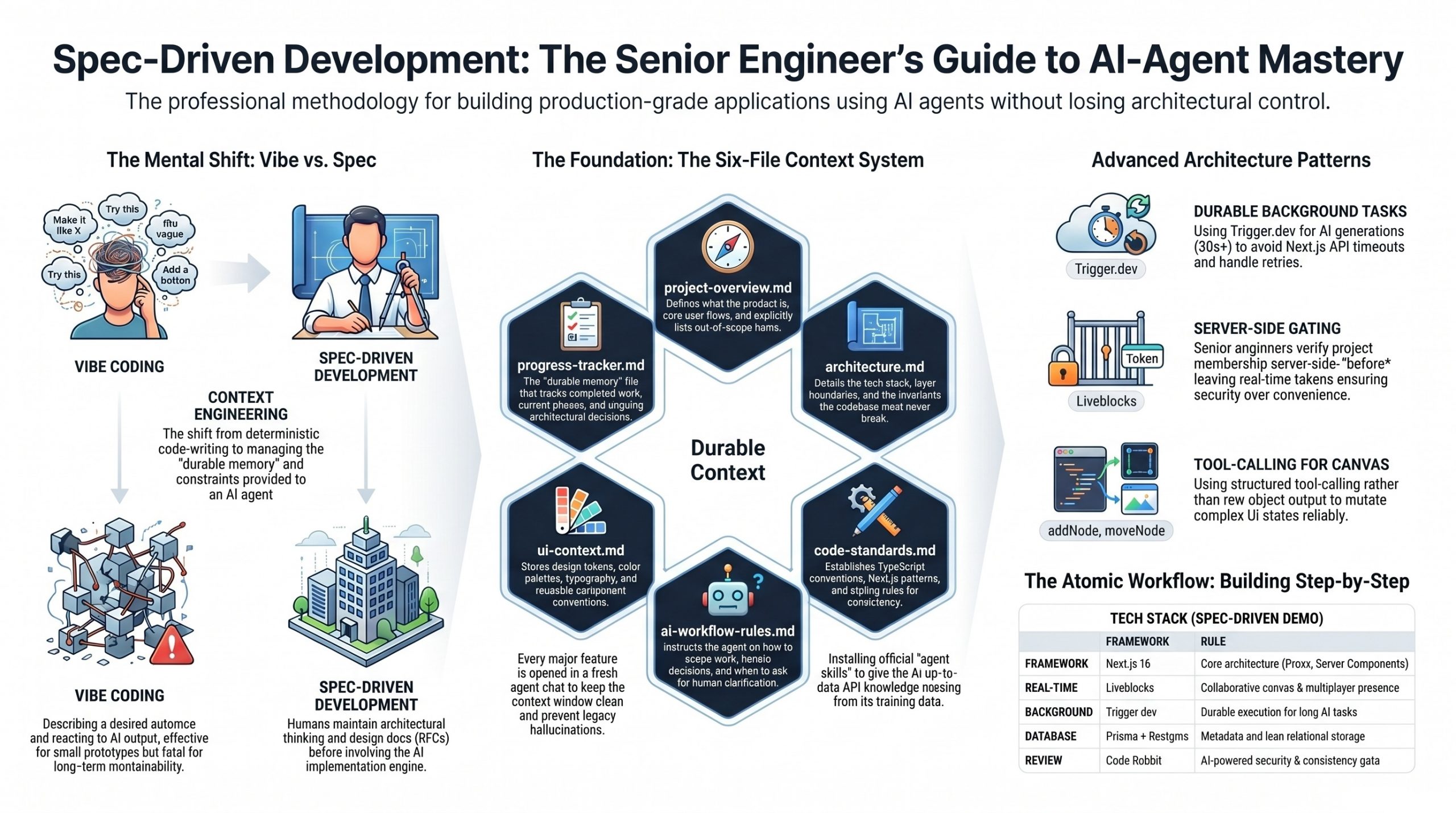
The video draws a sharp line between two AI development styles. Vibe coding describes what you want, lets the agent run, and reacts to the output — fine for prototypes, fatal for anything maintainable. Spec-driven development keeps the architectural thinking with the human and gives the agent a defined system to execute against. The author frames this as the same discipline senior engineers at Google, Amazon, and Netflix have always practiced — design docs, RFCs, and one-pagers written before code is touched.
The Six-File Context System
The methodological centerpiece is a /context folder containing six markdown files that travel with the project for its entire life:
- project-overview.md — what the product is, who it’s for, core flows, and explicitly out-of-scope items
- architecture.md — tech stack, layer boundaries, and invariants the codebase must never break
- code-standards.md — TypeScript, Next.js, and styling conventions for consistency
- ai-workflow-rules.md — how the agent should scope work and handle decisions
- ui-context.md — design tokens, color palette, fonts, and component conventions
- progress-tracker.md — the only file that updates constantly, holding current phase, completed work, and architectural decisions
A seventh file, agents.md (or claude.md, cursor.md depending on the agent), sits at the project root and instructs the agent to read all six context files before writing anything.
Feature Specs as Atomic Units
Beyond the persistent context, each unit of work gets its own spec file in /context/feature-specs/ (e.g., 01-design-system.md, 02-editor.md, etc.). Each spec defines a goal, design decisions, implementation details, dependencies, and a verification checklist. The build proceeds spec-by-spec across roughly 29 units, each typically opened in a fresh agent chat to keep context windows clean.
Agent Skills
A recurring pattern: every major library used (Clerk, Prisma, Liveblocks, Trigger.dev) ships an official “agent skills” package installed via npx skills add .... These give the agent up-to-date API knowledge that often isn’t in its training data — which proves critical when, for example, Next.js 16 renamed middleware.ts to proxy.ts.
Code Rabbit Integration
Every feature is reviewed by Code Rabbit either via pull request or directly in VS Code through the extension. The video repeatedly demonstrates how Code Rabbit catches accessibility issues, double-commit bugs, missing key handlers, and even security exposures (a JWT token accidentally committed in a current-issues.md file).
Architecture and Subject Sections
Authentication and Workspace Access
Clerk handles sign-in, sign-up, and route protection through a Next.js 16 proxy file. A key senior-level pattern emerges: project membership must be verified server-side before a Liveblocks token is ever issued, ensuring real-time rooms are gated by Clerk identity rather than left open to any websocket client.
The Collaborative Canvas
The canvas is built on React Flow synced through Liveblocks, with custom shape rendering (rectangles, diamonds, circles, pills, cylinders, hexagons), inline label editing, color toolbars, multi-handle edge connections, presence cursors with names and colors, undo/redo with keyboard shortcuts, and starter templates (microservices, CI/CD, event-driven). When debugging drag-and-drop issues, the video shows a particularly useful pattern — explicitly invoking the Liveblocks agent skill to surface best practices the agent had missed.
AI Generation via Trigger.dev
Because AI generation can take 30–60+ seconds and Next.js API routes time out, all AI work runs as durable background tasks on Trigger.dev. The design agent uses Gemini 2.5 Flash with the Vercel AI SDK and a tool-calling approach (rather than output: object) — each canvas mutation (addNode, moveNode, updateEdge, etc.) is its own tool. The frontend subscribes to live run status with useRealtimeRun, displays progress in the sidebar, and lets Liveblocks handle the canvas updates automatically. A hybrid storage model keeps Postgres lean (metadata only) while Vercel Blob holds the actual canvas snapshots and generated specs.
The Context-Engineering Mindset
This shift from deterministic code-writing to context-engineering mirrors a broader industry pattern. As a16z has observed, large-scale AI models are emerging as a fourth infrastructure pillar alongside compute, networking, and storage — programming itself is shifting from deterministic code to context engineering. The six-file system in this video is essentially that principle applied at the project level. Lance Martin’s work on context engineering for agents reinforces a complementary insight: offloading raw tool outputs to external storage rather than stuffing them into the agent’s message history alleviates pressure on the context window and helps maintain model performance — which is exactly why the progress tracker, rather than chat history, becomes the durable memory layer in this build.
The Senior Engineer Framing
The video addresses the elephant in the room — entry-level work is being automated, and freelance markets are being squeezed. The author’s argument is that the developers being squeezed aren’t the ones who learned deeply, but those who learned just enough to execute without understanding. This echoes Gregor Ojstersek’s framing in his Glasp Talk interview, where he cautions that AI tools, while boosting productivity, can erode deep understanding if used uncritically — mastery comes from wrestling with hard problems, not from bypassing them with automation. Ojstersek similarly emphasizes that in the AI world, human-related skills become more important, and engineering leadership is a mindset rather than a title — about making the team, product, and business better, which aligns with the video’s framing of the developer as architect rather than typist.
Conclusion and Key Takeaways
By the end, the build ships: a deployed Vercel app with multiplayer canvas, AI-generated architecture diagrams, downloadable Markdown specs, and proper auth-gated collaboration. The deeper lesson, though, is methodological — the same upfront work that took senior engineers weeks at Google or Amazon now takes hours with AI, but only if you actually do that work.
Key takeaways:
- Architecture before implementation — design the system, name the boundaries, and define invariants before opening any AI tool. The clearer your understanding, the better the AI output.
- Context files are non-negotiable — six persistent files plus per-feature specs prevent the week-three drift where the agent forgets every prior decision.
- Work in small, atomic units — one feature spec, one fresh chat, one verification checklist. Combining unrelated layers (frontend + backend + DB) in a single prompt gives the agent too much surface area for assumptions.
- Use agent skills aggressively — Clerk, Prisma, Liveblocks, and Trigger.dev all publish skills that bridge the gap between training data and current APIs.
- Long-running AI work belongs in background tasks — Trigger.dev handles retries, status streaming, and durable execution that API routes can’t.
- Always review AI output — Code Rabbit (or equivalent) catches the accessibility, security, and consistency issues the agent quietly introduces.
- Senior thinking is the moat — the tooling is generic; the architectural judgment isn’t.
Related References
- Next.js 16 documentation — particularly the rename of
middleware.ts→proxy.ts - Liveblocks — real-time multiplayer infrastructure with React Flow integration
- Trigger.dev — durable background tasks with realtime React hooks
- Clerk — authentication and user management with agent skills + MCP
- Prisma + Vercel Postgres — schema, migrations, and the cached singleton client pattern
- Vercel AI SDK + Google Gemini — tool-calling for structured AI canvas mutations
- Code Rabbit — AI code review for both PRs and inline VS Code feedback
