

Introduction
Open Design, a brand-new open-source alternative to Anthropic’s Claude Design that just hit GitHub. This is the second Claude Design clone the host has covered in a week — the first being Huashu Design, a terminal-only tool. What makes Open Design notable is that it ships with a full graphical interface, making it visually almost indistinguishable from Claude Design itself, while sidestepping the painful usage limits that have frustrated Claude Design users. The host frames the wave of clones as a healthy pressure on Anthropic to fix the usage caps that hold back the original product. Watch video about Open Design.
Open Design — Complete Guide
What Open Design Is
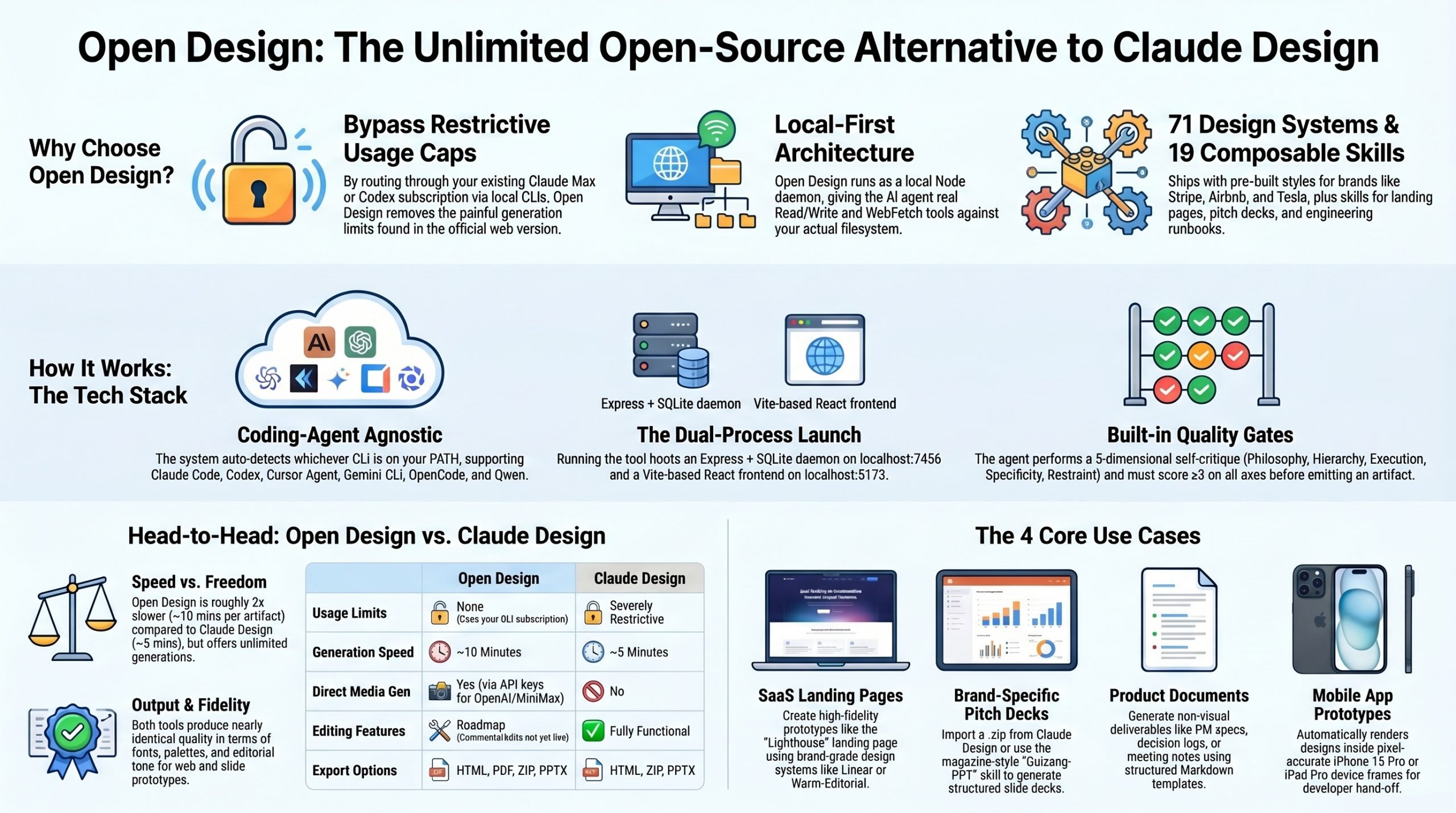
Open Design (OD) is a local-first, open-source alternative to Anthropic’s Claude Design, released in late April 2026 by the nexu-io team. It is licensed under Apache-2.0. Rather than bundling its own AI model, OD turns whichever coding-agent CLI you already have on your PATH (Claude Code, Codex, Cursor Agent, Gemini CLI, OpenCode, Qwen) into the design engine, driven by 19 composable skills and 71 brand-grade design systems.
The core concept: a local Node daemon spawns your chosen CLI inside a per-project working directory, gives it real Read/Write/Bash/WebFetch tools against an actual filesystem, and pipes the output into a sandboxed iframe preview in a Vite + React web UI. Because it routes through your Claude Max or Codex subscription via the CLI, you escape Claude Design’s painful usage caps.
Prerequisites
Before installing, make sure your machine has:
- Node.js approximately v18+ (the README quickstart works with Node 18+, though some forks recommend Node 22+)
- pnpm 10.33.x (install via
corepack enable) - Git
- At least one supported coding-agent CLI on your
PATH. The daemon auto-detects whichever it finds. The supported list is:claude,codex,cursor-agent,gemini,opencode,qwen. If none are installed, you can fall back to a direct Anthropic API key (BYOK).
Verify before continuing:
node --version
corepack enable && pnpm --version
which claude || which codex || which cursor-agent
Installation
There are two paths, mirroring what the YouTube reviewer demonstrated.
Method 1 — Manual clone (recommended for first install)
git clone <https://github.com/nexu-io/open-design.git>
cd open-design
corepack enable
pnpm install
pnpm dev:all
pnpm dev:all boots two processes simultaneously:
- The daemon on
http://localhost:7456(Express + SQLite, the only privileged process) - The Vite frontend on
http://localhost:5173
Open http://localhost:5173 in your browser. If the default ports are busy, the daemon auto-picks a free one (PR #9).
Method 2 — Hand it to your coding agent
This is the lazy option the reviewer mentioned. Open Claude Code or Codex in an empty directory and prompt:
Clone
https://github.com/nexu-io/open-design.gitinto a new folder, install dependencies with pnpm, and start the dev server withpnpm dev:all.
The agent will execute the clone, install, and boot — useful when you don’t want to read the README first.
What gets created on first run
The daemon creates a hidden .od/ folder at the repo root. It is gitignored and machine-local:
.od/
├── app.sqlite          ← projects, conversations, messages, open tabs
├── artifacts/          ← one-off "Save to disk" renders (timestamped)
└── projects/<id>/      ← per-project working dir, also the agent's cwd
To wipe everything and start clean: stop the daemon, rm -rf .od, and re-run pnpm dev:all.
First-Run Setup
When you first hit http://localhost:5173, a welcome dialog appears asking how you want to drive the model.
Step 1 — Pick the agent runtime. You have three choices:
- Local CLI (recommended) — pulls from Claude Code or Codex on your machine, billed against your existing Max/Pro/Codex subscription. No per-token API fees. This is the path that bypasses Claude Design’s usage caps.
- Anthropic API · BYOK — paste an
sk-ant-...key directly. Used as a fallback when no CLI is onPATH. You pay API fees per generation. - OpenAI-compatible relay — for users on OpenRouter, DeepSeek, or local Ollama via a compatible endpoint.
Step 2 — Pick the model. For Local CLI, leaving it on default uses whatever your CLI is configured for (e.g., Sonnet 4.6 / Opus 4.7 in Claude Code). You can override per-project later.
Step 3 — Optional: add media providers. Unlike Claude Design, OD can generate images and video directly from the UI — but only if you wire in API keys. Settings → Media Providers accepts keys for MiniMax, OpenAI (DALL·E / Sora), ElevenLabs, and similar. Skip this for now if you only need prototypes and slides.
That’s it. The agent picker on the main screen should now show whichever CLI was auto-detected.
Configuration
Agent selection
The bottom-of-screen agent picker lets you swap on the fly. The daemon scans your PATH at boot — if you install Codex later, restart the daemon (pnpm dev:all) to pick it up. Adding a new CLI is a one-line addition to daemon/agents.js if you want to wire something custom.
Design Systems (71 built-in)
Top-nav → Design Systems. Each is a single DESIGN.md file living under design-systems/<brand>/ following a 9-section schema (color, typography, spacing, layout, components, motion, voice, brand, anti-patterns). The library covers:
- AI/LLM — Claude, Anthropic, Cohere, Mistral, ElevenLabs, Replicate, RunwayML
- Dev tools — Linear, Vercel, Cursor, Stripe, Supabase, Framer, Notion, Figma
- Fintech / E-com — Stripe, Coinbase, Airbnb, Shopify, Tesla
- Starters —
default(Neutral Modern),warm-editorial
To add your own, drop a folder into design-systems/<your-brand>/ with a DESIGN.md in the same schema, and restart the daemon. Or — exactly as the reviewer demonstrated — export a design system from Claude Design itself via Share → Download Project as ZIP and import it through the Import Claude Design ZIP button in the project setup screen.
To re-sync the upstream catalog from VoltAgent/awesome-design-md:
node scripts/sync-design-systems.mjs
Skills (19 built-in)
Top-nav → Skills. Skills are folders under skills/ containing a SKILL.md (Claude Code’s standard convention) plus optional assets/ and references/. Adding a skill is the same pattern: drop a folder, restart the daemon, it appears in the picker. The shipped skills break into three families:
- Design surfaces —
web-prototype,saas-landing,dashboard,pricing-page,docs-page,blog-post,mobile-app,simple-deck,guizang-ppt(the magazine-style deck default, bundled verbatim fromop7418/guizang-ppt-skill) - Document/work-product —
pm-spec,weekly-update,meeting-notes,eng-runbook,finance-report,hr-onboarding,invoice,kanban-board,team-okrs - Showcase —
dating-web,digital-eguide,email-marketing,gamified-app,mobile-onboarding,motion-frames,social-carousel,sprite-animation
The extended od: frontmatter (mode, platform, scenario, preview, design_system) is documented in docs/skills-protocol.md.
Visual directions (the brand-less fallback)
When you start a project without a design system, OD’s discovery form offers five deterministic “schools” — Editorial Monocle, Modern Minimal, Tech Utility, Brutalist, Soft Warm. One radio click locks an OKLch palette and font stack, no model freestyle. This is the single biggest anti-AI-slop gate.
Simple Use Cases
Use Case 1 — A SaaS landing page
This mirrors the Lighthouse example from the YouTube video.
- From the home screen, name your demo (e.g.,
Lighthouse landing). - Skill →
saas-landing. - Design system → pick one (e.g.,
linear-appfor cool minimalism,warm-editorialfor a magazine vibe), or leave blank to get the direction picker. - Fidelity → High fidelity.
- Prompt: Landing page for a fake SaaS product called Lighthouse. Analytics for solo founders and small teams. Generate three layout variants — classic stacked, editorial, and bold/loud — so I can compare them.
- Hit Send. The discovery form pops first (audience, tone, constraints) — answer in ~30 seconds via radios.
- Live
TodoWriteplan streams in the right panel as the agent works. - The artifact renders in a sandboxed iframe within ~10 minutes (slower than Claude Design’s ~5 minutes, per the reviewer).
- Export → HTML (with inline CSS), PDF, or ZIP.
Use Case 2 — A pitch deck with your own brand
Use this when you want a slide deck in a style you’ve already authored in Claude Design.
- In Claude Design, open your existing design system → Share → Download Project as .zip.
- In Open Design’s project setup, click Import Claude Design ZIP and upload it.
- Skill →
guizang-ppt(the magazine-style default). - Prompt: Create a pitch deck for Lighthouse, our SaaS analytics product. Audience: product folks at a launch event. Keep it short (8 slides). High fidelity. Use the imported design system. Visual tone: brutalist.
- Answer the question form — speaker notes? Story arc? Length? Tone?
- The agent walks a P0/P1/P2 checklist before emitting, runs a 5-dimensional self-critique (philosophy / hierarchy / execution / specificity / restraint), and only emits
<artifact>when it scores ≥3 on every axis. - Preview swipes horizontally inside the iframe. Export to PPTX expects ~5 minutes of manual cleanup on spacing/alignment per the reviewer’s experience.
Use Case 3 — A working-product document (no design system needed)
OD is also useful for non-visual document deliverables — handy for your K-ONE workflows like PM specs or runbooks.
- Skill →
pm-spec(oreng-runbook,finance-report, etc.). - No design system needed — the templates ship with sensible defaults.
- Prompt: Draft a PM spec for the ECO Mobile Washer firmware update v2.1, covering single-phase 230VAC support, new PCM water heater integration, and the Odoo sync pipeline. Include a decision log section.
- Output is a structured Markdown/HTML doc with TOC, decision log, and acceptance criteria sections — exportable as HTML, PDF, or Markdown.
Use Case 4 — A mobile app prototype with device frames
- Skill →
mobile-appormobile-onboarding. - Platform → mobile (the daemon auto-injects pixel-accurate iPhone 15 Pro / Pixel / iPad Pro frames from
assets/frames/, so the agent never re-draws a phone). - Prompt: Three-screen onboarding for a Singapore food-court loyalty app. Splash, value-prop, sign-in. Bilingual EN/ZH labels. Soft warm direction.
- The output renders inside a real device chrome (Dynamic Island, status-bar SVG, home indicator) — directly hand-off-able to a developer.
Tips and Things to Watch
- Use
Local CLI, not BYOK API, unless you specifically want to test something without your Max subscription. The whole point of Open Design over Claude Design is escaping usage caps — going through the Anthropic API path defeats that. - Custom design system without a Claude Design subscription: there’s no in-UI authoring tool yet. Either drop a folder under
design-systems/<brand>/with a 9-sectionDESIGN.md, or use Claude Code in the terminal to scaffold one then import via the ZIP path. - The reviewer’s “bloat” warning is fair — Image Templates and Video Templates look impressive but are mostly one-line example prompts. Don’t expect production output from those tabs.
- Quality-of-life features missing as of this writing — comment-mode surgical edits and the AI-emitted tweaks panel are visible in the UI but not yet functional. They are explicitly on the roadmap.
- Speed is ~2× slower than Claude Design — this is the cost of the local CLI loop. For high-iteration work, expect 8–12 minutes per artifact.
- Cleanup expected on PPTX exports — slides look correct in-browser but spacing and box-overflow issues appear post-export. Budget 5 minutes of manual cleanup per deck.
Architecture in One Diagram
Browser (Vite + React)
   │ /api/* SSE
   ▼
Daemon (Express + SQLite, port 7456)
   │ spawn(cli, [...], cwd: .od/projects/<id>)
   ▼
Your CLI (claude / codex / cursor-agent / gemini / opencode / qwen)
   │ reads SKILL.md + DESIGN.md, writes <artifact> to disk
   ▼
Sandboxed iframe preview + file workspace + export pipeline (HTML/PDF/PPTX/ZIP/MD)
Every layer is a file you can edit. The prompt stack — src/prompts/system.ts and src/prompts/discovery.ts — is where most of the design quality lives, and it’s where you’d customize behavior for K-ONE-specific workflows.
Video about Open Design (OD)
New Features and Concept
Open Design is essentially a polished UI layer built on top of Huashu Design, combined with the Guang PowerPoint skill, Open Code Design, and Multica. Out of the box it ships with 31 skills and 72 design systems preloaded.
Key capabilities and design choices:
- Coding-agent agnostic — connects to Claude Code, Codex, Gemini, or any tool you bring an API key for. It auto-detects which coding agents are installed on your machine.
- Local CLI mode — pulling from your Claude Max or Codex subscription instead of paying API fees per generation.
- Media providers — unlike Claude Design, you can plug in API keys for image and video generation (MiniMax, OpenAI, ElevenLabs, etc.) and produce media directly from the UI.
- Tabs across the top — Designs, Examples, Design Systems, Image Templates, Video Templates.
- Two-step install — either paste the repo’s install command into a terminal, or hand the install link to Claude Code/Codex and let it spin up the project and dev server itself.
Walking Through the Tool
Design systems. These are pre-extracted style profiles (palette, typography, components, visual theme, atmosphere) from real sites — Airbnb-style scaffolds you can prompt against. The host finds these interesting in concept but mixed in practice; results vary, and the image and video template sections he flags outright as bloat — surface-level eye candy without real reusable value.
Examples. The example outputs look impressive until you realize each was generated from a single one-line prompt. Useful as proof-of-life, not as a benchmark of what serious prompting produces.
Creating prototypes and slide decks. This is the actual core workflow and it mirrors Claude Design closely — name the demo, pick one or more design systems, choose wireframe vs. high-fidelity, optionally import a Claude Design ZIP, and hit create. Open Design then runs the same Q&A brief flow Claude Design uses (clickable buttons, structured questions about audience, fidelity, tone, etc.).
Bringing your own design system. There’s no built-in UI to author one from scratch. The workaround: build the design system inside Claude Design first, use Share → Download Project as ZIP, then import that ZIP into Open Design. The host calls this janky and notes that Huashu Design’s terminal-based approach is actually more flexible here — you can just point Claude Code at a directory and say “recreate this style.”
Head-to-Head: Open Design vs. Claude Design
The host ran the same Lighthouse SaaS landing-page prompt through both tools:
| Aspect | Open Design | Claude Design |
|---|---|---|
| Output quality | Very similar — same fonts, palette, editorial tone | Reference standard |
| Speed | ~10 minutes | ~5 minutes |
| Q&A brief flow | Identical | Identical |
| Quality-of-life features (comments, edits, draw) | Listed but not yet functional (on the roadmap) | Fully working |
| Tweaks panel | Must be prompted into existence manually | Built in |
| Usage limits | None (uses your Max/Codex subscription) | Severely restrictive |
When exporting a brutalist slide deck for the same fake SaaS product to PowerPoint, the host rates it a “90% solution” — on-brand with the supplied design system, but with spacing and layout issues on roughly half the slides that need ~5 minutes of manual cleanup.
Verdict and Takeaways
- Open Design is a credible, polished open-source clone of Claude Design — especially impressive given it launched the same week as the review.
- It’s slower and rougher than Claude Design, missing some quality-of-life features and producing exports that need light cleanup.
- If you need a GUI, this is the strongest Claude Design alternative right now and avoids the usage wall entirely.
- If you don’t need a GUI, Huashu Design (terminal-only) is faster and more flexible because you can talk to it the way you’d talk to Claude Code.
- Image/video templates and design system gallery skew toward bloat — focus on the prototype and slide-deck workflows.
- Importing a Claude Design ZIP is the cleanest path to using your own design system inside Open Design.
- The host’s bigger-picture take: the more clones like this ship, the more pressure Anthropic feels to fix Claude Design’s usage caps — which is the real bottleneck.
References
- Open Design repo — https://github.com/nexu-io/open-design
- Quickstart — https://github.com/nexu-io/open-design/blob/main/QUICKSTART.md
- Skills protocol — https://github.com/nexu-io/open-design/blob/main/docs/skills-protocol.md
- Architecture — https://github.com/nexu-io/open-design/blob/main/docs/architecture.md
- Roadmap — https://github.com/nexu-io/open-design/blob/main/docs/roadmap.md
- Huashu Design (the design-philosophy compass) — https://github.com/alchaincyf/huashu-design
- Guizang PPT skill (bundled deck mode) — https://github.com/op7418/guizang-ppt-skill
- Open CoDesign (the desktop sibling project) — https://github.com/OpenCoworkAI/open-codesign
- awesome-claude-design (DESIGN.md catalog) — https://github.com/VoltAgent/awesome-claude-design
- Claude Code SKILL.md convention — https://docs.anthropic.com/en/docs/claude-code/skills
- Claude Design — Anthropic’s original, the benchmark being cloned
- MiniMax, OpenAI, ElevenLabs — media-generation API providers that plug into the media tab
